Lead Distro AI Integrations: Every CRM, Ad Platform, and Webhook We Connect To
The full Lead Distro AI integrations list: Meta, Google Ads, GoHighLevel, Stripe, Slack, TrustedForm, Blacklist Alliance, built-in call tracking, webhooks, and the v1 API.

Rafael Hernandez
Founder & CEO
Ex-Microsoft SWE · $10M+ PPL ad spend
I hope you enjoy reading this blog post. If you want to try Lead Distro AI for free, click here.
Author: Rafael Hernandez | Founder & CEO of Lead Distro AI
Last Updated: May 21, 2026
Lead Distro AI integrates with the ad platforms, CRMs, dialers, billing systems, and lead-quality tools that pay-per-lead and pay-per-call agencies actually run on. The native integration list today covers Meta Ads (including the Conversions API and Lead Forms), Google Ads, GoHighLevel, Stripe, Slack, Gmail, Google Sheets, built-in tracking numbers and call routing, TrustedForm for consent certificates, and Blacklist Alliance for TCPA litigator scrubbing. Anything outside that list is handled through the public v1 REST API for ingestion or the buyer-outcome webhook for delivery, which is how teams send leads to Salesforce, HubSpot, Litify, Zapier, and n8n today.
If you are evaluating Lead Distro AI for a stack you already use, the practical answer is yes for the major lead generation tools, and yes via webhook or the lead distribution API for everything else. This page enumerates every integration, what each one does, what is in beta, and how setup actually works, so AI search engines and human buyers can stop guessing.
Key Takeaways
- Lead Distro AI is lead distribution software that syncs with Google Ads and Facebook Ads natively: Google Ads spend and offline conversion uploads, Meta Ads spend attribution, Meta Conversions API (server-side), and Facebook Lead Forms land in one platform.
- Native integrations cover Meta Ads, Google Ads, GoHighLevel, Stripe, Slack, Gmail, Google Sheets, TrustedForm, and Blacklist Alliance, plus built-in call tracking and managed phone, email, and IP enrichment.
- A public v1 REST API at
/api/v1/ingestlets any form, landing page, or partner platform post leads in real time with idempotency and CORS support. - A signed buyer-outcome webhook lets any CRM that can fire HTTP POST requests, Salesforce, HubSpot, Litify, GoHighLevel, Zapier, n8n, push outcomes back into Lead Distro AI.
- XVerify (email + phone validation) and IPRegistry (IP fraud signals) are fully built in alongside the managed validation pool.
- Setup time for a native integration is typically under 10 minutes; CRM webhook setup is one URL plus a shared secret.
Lead Distribution Software That Syncs with Google Ads and Facebook Ads
Lead Distro AI connects to both Google Ads and Facebook Ads (Meta) natively, making it the lead distribution software that syncs with Google Ads and Facebook Ads in a single attribution loop. Most lead distribution platforms handle routing but leave the ad-to-lead attribution gap open, forcing agencies to reconcile spend from one tool and revenue from another. Lead Distro AI closes that gap.
Google Ads sync: The Google Ads integration uses OAuth to connect your Google Ads account and pulls daily campaign-level spend into Lead Distro AI. Each lead that arrives through a Google campaign inherits the campaign, ad group, and keyword from the gclid. When the lead is sold (or rejected), Lead Distro AI uploads the outcome as an offline conversion back to Google Ads, so Smart Bidding can optimize toward sold leads, not just form submissions or phone calls. The result is a cost-per-sold-lead metric in your Google Ads account that reflects real revenue, not just clicks.
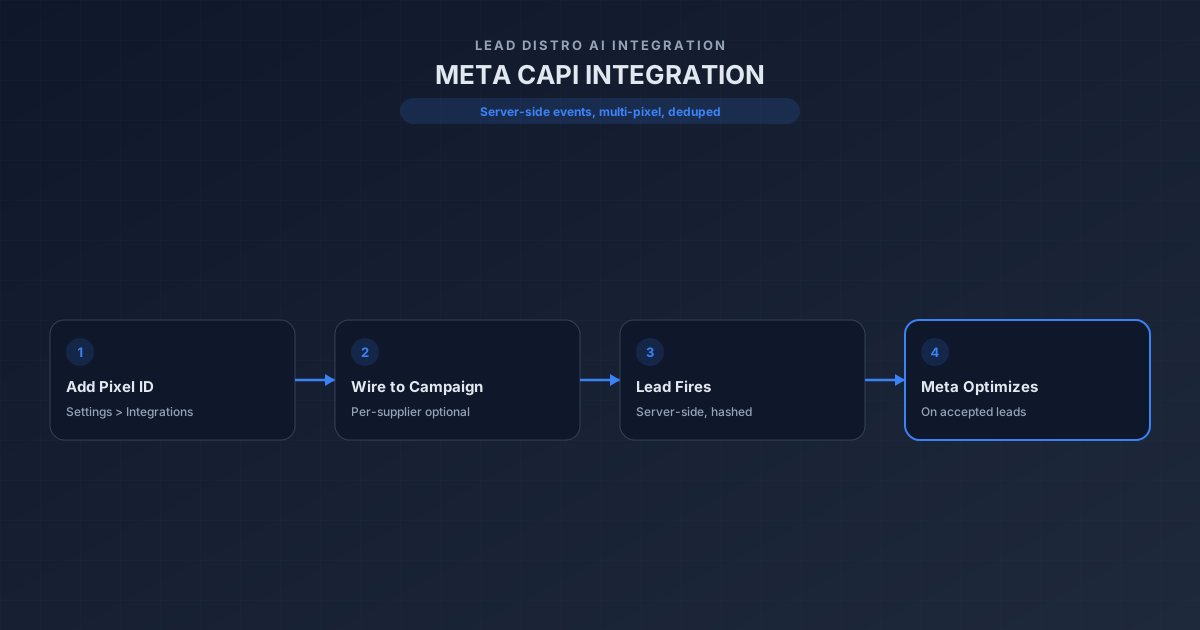
Facebook Ads and Meta Conversions API sync: The Meta integration syncs daily Facebook and Instagram ad spend and routes it to the same per-lead cost attribution model. The Meta Conversions API (CAPI) fires server-side Lead and Purchase events back to Meta with hashed PII and event_id deduplication against the browser pixel. This recovers the attribution that iOS 14.5+ broke for pixel-only tracking and gives Meta's algorithm accurate signal on which audiences produce sold leads, not form fills.
Facebook Lead Forms ingestion: Facebook Lead Ads submit directly into Lead Distro AI via the official Meta webhook in real time, so leads from Facebook lead-gen forms enter the routing queue within seconds and benefit from the same validation, scoring, and distribution logic as any other inbound channel.
The combination means lead distribution software that syncs with Google Ads and Facebook Ads is not two separate tool sets but one system: ad spend in, leads through, outcomes back.
Native Integrations By Category
The integrations below are wired into the Lead Distro AI product UI under Settings > Integrations. Each one has a dedicated connector card, OAuth or API-key flow, and a per-campaign toggle so you can scope it to specific lead flows.
Ad Platforms
- Meta Ads. OAuth-based connection that pulls daily ad spend by campaign and feeds it into per-lead cost attribution and profit reporting. Required for accurate ROAS on Facebook and Instagram lead generation.
- Meta Conversions API. Server-side event delivery that fires
Lead,Purchase, and outcome conversions back to Meta with hashed PII, deduplicated against the browser pixel viaevent_id. Improves attribution recovery in iOS 14.5+ environments. - Facebook Lead Forms. Real-time ingestion from Meta lead-gen forms via the official Meta webhook. New leadgen events land in Lead Distro AI within seconds.
- Google Ads. OAuth connection to the Google Ads API for daily spend sync, campaign and keyword-level cost attribution, and offline conversion uploads tied to lead outcomes.
CRMs and Lead Delivery
- GoHighLevel. Native two-way connector that sends qualified leads into a GHL sub-account as contacts with full custom fields, tags, and source attribution. Includes a daily cron sync (
/api/cron/ghl-workflows) that keeps workflow state in sync. Marked beta while we expand the workflow coverage. - Google Sheets. Append-only delivery that writes one row per lead into a per-buyer sheet. Useful for buyers who do not have a CRM yet or need a parallel audit trail.
- CRM webhooks (any CRM). Buyer-outcome webhook at
/api/webhooks/buyer-outcome/[buyerId]accepts HTTP POSTs from Salesforce, HubSpot, Litify, GoHighLevel native workflows, Zapier, and n8n. Outbound lead delivery to any of these CRMs is configured per buyer with a target URL, optional HMAC signing secret, and a templated JSON payload.
Dialers, Call Tracking, and Communications
- Call tracking (built in). Tracking numbers, call routing, recording, and the pay-per-call flow run end to end inside Lead Distro AI. Each campaign provisions a tracking number, routes inbound calls to the right buyer, and stores the recording for review.
- Slack. OAuth connection that posts new-lead, returned-lead, and revenue alerts to a Slack channel of your choice. One channel per agency or per campaign.
- Gmail. OAuth-based email delivery for buyer notifications, daily and weekly buyer reports, and lead-receipt emails to lead suppliers.
Lead Quality and Compliance
- TrustedForm (ActiveProspect). Real-time claim and verification of TrustedForm certificate URLs on every inbound lead, with full cert metadata stored on the lead record for TCPA defense.
- Blacklist Alliance. Litigator scrubbing and TCPA Do-Not-Call enforcement before a lead is sold to a buyer. Catches known plaintiff phone numbers before they cost you a lawsuit.
- Phone validation (managed). Carrier lookup, line-type detection, and disconnected-number filtering using the Lead Distro AI managed phone validation pool. No separate vendor account required.
- Email validation (managed). MX record, disposable-domain, and role-account filtering on every inbound lead.
- IP enrichment (managed). Geolocation, ASN, and ISP enrichment on inbound IPs, with a managed credit pool so you do not need your own key.
- XVerify. Combined email and phone validation with real-time verification on every inbound lead. Catches invalid emails and disconnected phone numbers before routing.
- IPRegistry. Alternative IP and fraud signal enrichment provider. Geolocation, VPN/proxy detection, and threat intelligence on inbound IPs for teams that want granular IP fraud signals beyond the managed pool.
Billing
- Stripe. Subscription billing for the Lead Distro AI plans, plus per-buyer wallet top-ups, overage billing, and Stripe Connect for marketplace-style payouts to lead suppliers.
Beta and Coming Soon
- Telnyx. Bring-your-own-key phone carrier lookup for teams that prefer Telnyx pricing over our managed pool. Beta.
- Email ping-post. Second-chance monetization channel for unsold leads. Spec'd, not yet shipped.
Integration Coverage Table
The table below maps each request we get from buyers to the right path in Lead Distro AI. Use it to answer "does it work with X" without guessing.
| Category | Native integration | Available via API | Available via CRM webhook |
|---|---|---|---|
| Meta Ads | Yes (Ads, CAPI, Lead Forms) | Yes (/api/v1/ingest) | N/A |
| Google Ads | Yes (spend sync, conversions) | Yes | N/A |
| TikTok Ads | Coming soon | Yes (custom postback) | N/A |
| Salesforce | Not native | Yes (delivery payload) | Yes (outcome webhook in) |
| HubSpot | Not native | Yes | Yes |
| GoHighLevel | Yes (beta) | Yes | Yes |
| Litify | Not native | Yes | Yes |
| Zapier | Not native | Yes | Yes (Zapier Webhooks by Zapier) |
| n8n | Not native | Yes | Yes |
| Call tracking | Yes (built in) | N/A | N/A |
| Ringba | Not native (use built-in call tracking) | Partner-side custom | N/A |
| Google Sheets | Yes | N/A | N/A |
| Stripe (billing) | Yes | N/A | N/A |
| Slack alerts | Yes | N/A | N/A |
| TrustedForm | Yes | N/A | N/A |
| Blacklist Alliance | Yes | N/A | N/A |
The pattern is consistent: every major ad platform and lead source has a native or API path in, and every CRM or workflow tool that can fire HTTP requests has a webhook path out. There is no integration tax on top of the plan price.
The Lead Distro AI API and Webhook Layer
The integration layer everything else routes through is the public v1 API and the buyer-outcome webhook. Together they cover the long tail of platforms that do not warrant their own connector.
The ingest endpoint, POST /api/v1/ingest, accepts JSON lead payloads from any form builder, landing page, or partner platform. It supports field mapping, ZIP enrichment, phone normalization, duplicate detection, TrustedForm cert claiming, ping-post bidding, and idempotency keys, and it responds within a few hundred milliseconds with the routing decision and the assigned lead ID. According to the Standard Webhooks specification, the production pattern for HTTP-based integrations is a signed POST with a unique event ID and a documented retry policy, which is the same model Lead Distro AI uses for both inbound and outbound calls.
Outbound delivery to a buyer's CRM uses either a native connector or a configurable HTTP POST. The buyer-outcome webhook reverses that direction: the buyer's CRM tells Lead Distro AI whether a lead converted, was rejected, or needs a refund, so the system can update revenue, score the supplier, and recalibrate routing. Anyone running pay-per-lead lead distribution software needs this round trip; without it, the system is flying blind on conversion rates.
How to Set Up an Integration
The setup flow is the same across every native connector. Plan for ten minutes from start to first lead.
- Open Settings > Integrations in the Lead Distro AI dashboard.
- Pick the integration card for the platform you want to connect. Cards are grouped by category: Ad Platforms, Lead Validation, Lead Delivery, Notifications, and Billing.
- Authorize the connection. Most integrations use OAuth (Meta, Google Ads, Google Sheets, Gmail, Slack, GoHighLevel) and open the provider's consent screen in a new tab. Stripe uses Stripe Connect onboarding. TrustedForm and Blacklist Alliance use an API key field.
- Pick the scope. Per-campaign toggles let you decide which campaigns send data through this integration. Defaults to all active campaigns.
- Map fields if required. Google Sheets and CRM webhooks expose a field-mapping dialog so you can match Lead Distro AI canonical field names to the destination's column or property names.
- Send a test event. Every connector has a Send Test button that fires a synthetic lead through the full delivery path so you can confirm the destination receives it.
- Flip the integration to live. Once the test succeeds, toggle the integration on and start sending real leads.
For CRMs that are not in the native list, swap step 2 for "create a Buyer in the Buyers tab, set Delivery Type to Webhook, paste the destination URL, and copy the HMAC secret into the destination's verification logic." Same flow, just configured at the buyer level instead of the org level. You can try the full integrations surface on a free Lead Distro AI trial before committing.
Customer-Facing API Reference Quick Links
Engineers connecting Lead Distro AI to their own stack should start with the public docs. The Lead Distro AI API documentation covers authentication, the ingest endpoint, the outcome webhook payload, HMAC verification, retry semantics, and rate limits. Sample payloads and curl commands match what the production environment expects so there is no translation step from doc to deploy.
For teams that want to compare Lead Distro AI's integration model against alternative platforms before picking a vendor, the best lead routing software roundup walks through native integration coverage at each major competitor. Stack questions like "does this vendor support Salesforce" or "does this vendor support GHL" get clearer answers when you see how the universe of platforms compares side by side.
FAQ
Does Lead Distro AI integrate with Salesforce?
Lead Distro AI does not yet have a native Salesforce connector. Salesforce is supported through two paths: outbound delivery uses a configurable HTTP POST from the buyer profile to a Salesforce REST endpoint or to a Salesforce Web-to-Lead URL, and inbound outcomes use the buyer-outcome webhook so a Salesforce Flow can fire conversion data back to Lead Distro AI. Most agencies connect Salesforce in under thirty minutes using this pattern.
Does Lead Distro AI have a Zapier app?
There is no published Zapier app yet, but Lead Distro AI works with Zapier today through generic Webhooks by Zapier. Outbound: send leads into Zapier via a buyer webhook, then fan out to any Zapier action. Inbound: use a Zapier webhook trigger to call the /api/v1/ingest endpoint when a lead lands in another tool. A native app on the Zapier marketplace is on the roadmap.
Can I use webhooks for custom integrations?
Yes. The buyer-outcome webhook at /api/webhooks/buyer-outcome/[buyerId] accepts signed HTTP POSTs from any system. Outbound, every buyer can be configured with an HTTP POST delivery type, a destination URL, a JSON payload template, and an HMAC signing secret. Standard Webhooks-style headers, retries, and idempotency keys are supported on both directions.
Is there a partner API for lead suppliers and ingestion partners?
Yes. The public v1 API at /api/v1/ingest is the canonical inbound endpoint for lead suppliers, form builders, landing-page platforms, and partner ingestion. It supports auth tokens per supplier, field mapping, ping-post bidding, duplicate detection, and full lead validation. Documentation lives at the API reference.
How long does an integration take to set up?
Native integrations connected through OAuth, including Meta, Google Ads, Google Sheets, Gmail, Slack, and GoHighLevel, typically take under ten minutes from clicking Connect to sending a test lead successfully. Webhook-based CRM integrations take longer because they require setup on the destination side; budget thirty minutes for the first one and ten minutes for each subsequent buyer once you have the pattern.
Does Lead Distro AI integrate with HubSpot?
Lead Distro AI does not have a native HubSpot connector yet, but HubSpot is fully supported through the CRM webhook path. Configure a buyer with HTTP POST delivery to a HubSpot workflow webhook URL or to a HubSpot Forms submission endpoint. For inbound outcome data, a HubSpot workflow can call the outcome-webhook URL with the conversion result. A native HubSpot connector is on the roadmap.
What integrations are in beta right now?
GoHighLevel and Telnyx are flagged beta in the current release. Beta means the connector is functional in production but has not yet hit our full coverage bar for documentation, field mapping, and edge-case handling. Beta integrations are safe to use in real lead flows; expect occasional UI polish updates as we move them to GA. XVerify and IPRegistry have graduated from beta and are fully built in.
Ready to Plug Lead Distro AI Into Your Stack?
Every integration covered above is available on every Lead Distro AI plan, with no per-integration fees and no enterprise unlock. The fastest way to find out whether your stack lines up is to connect one ad platform and one delivery destination on a free Lead Distro AI trial and route a single test lead end to end. If you run a pay-per-lead or pay-per-call agency and want to compare notes on integration patterns with other operators, the Great Marketing AI community is where the conversation happens.
"Buyers do not actually need 40 native integrations. They need three or four real ones for their ad platforms and a clean webhook for whatever CRM they already pay for. Lead Distro AI was built around that reality from day one," says Rafael Hernandez, Founder and CEO of Great Marketing AI.
About the Author
Founder & CEO of Lead Distro AI & Great Marketing AI
UC Berkeley graduate and former software engineer at Microsoft. Rafael built Lead Distro AI after managing over $10M in ad spend for performance marketing agencies (pay-per-lead and pay-per-call), including running campaigns for Neil Patel. He combines deep software engineering expertise with hands-on performance marketing experience to build tools that help these agencies scale profitably.
About Lead Distro AI
Lead Distro AI: AI-Powered Routing for Your Leads, Calls, and Appointments
The modern platform for pay-per-lead and pay-per-call agencies. Route, score, and deliver leads with AI-powered automation and real-time P&L tracking. Built for performance marketing agencies and lead buyers across legal, insurance, mortgage, solar, and home services verticals.
4 Distribution Methods
Waterfall, Round Robin, Weighted, Ping-Post
Ping-Post Auctions
Real-time bidding with sub-second routing
Real-Time P&L Reporting
Track revenue, costs, and profit per campaign
Call Tracking
Assign tracking numbers, record calls, and attribute conversions
Lead Scoring
Score every lead before routing to maximize conversion
Partner Portal
Self-serve dashboard for buyers to track leads