Google Ads Call Tracking: Track and Optimize Phone Leads
Google Ads call tracking explained: Google forwarding numbers, third-party DNI, gclid conversion import, and Smart Bidding to optimize for phone calls.

Rafael Hernandez
Founder & CEO
Ex-Microsoft SWE · $10M+ PPL ad spend
I hope you enjoy reading this blog post. If you want to try Lead Distro AI for free, click here.
Author: Rafael Hernandez | Founder & CEO of Lead Distro AI
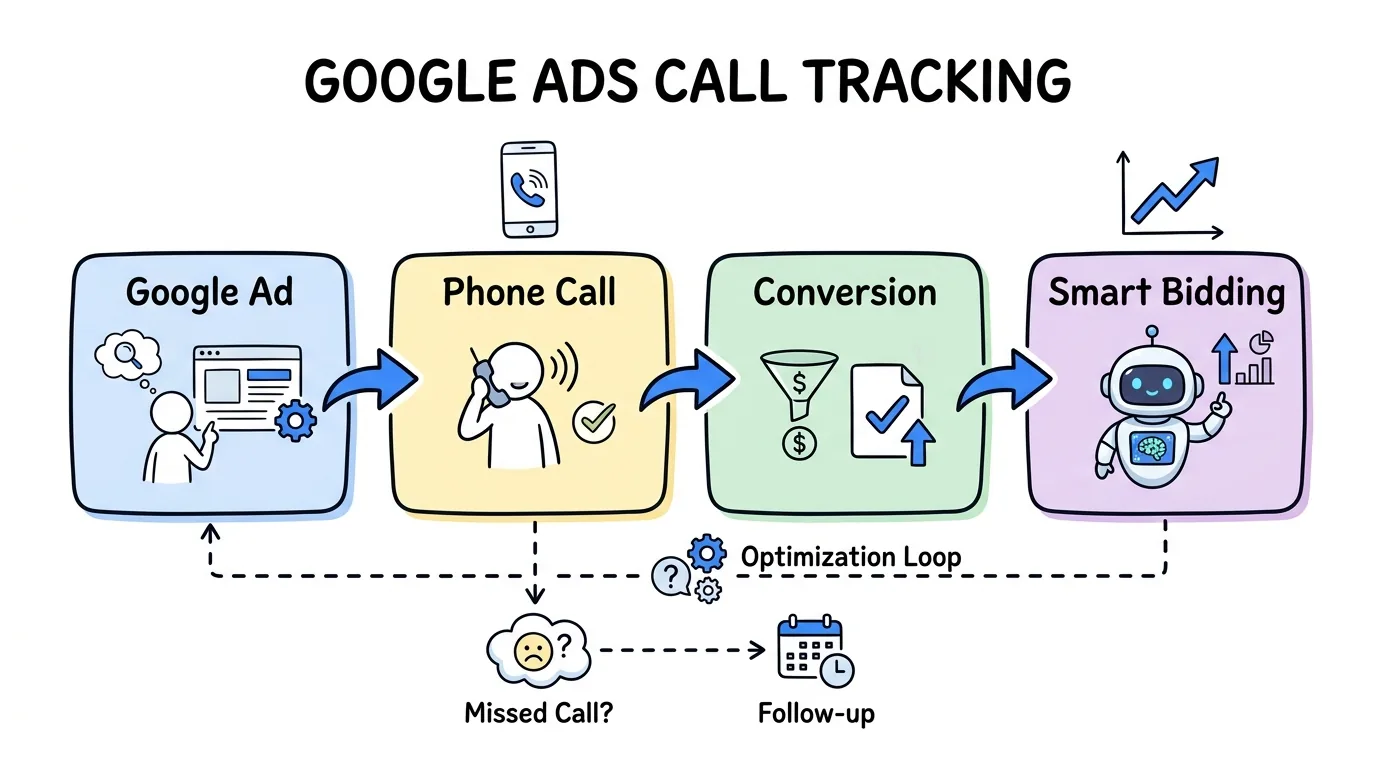
Google Ads call tracking works in two layers: Google's built-in call reporting and third-party call tracking. Google's call reporting assigns a free forwarding number to your call assets and call ads, then logs duration, start time, and caller area code so you can count qualified calls as conversions. Third-party call tracking adds dynamic number insertion on your website to capture calls from visitors who click an ad, browse, then dial, importing those calls back into Google Ads through the gclid. Once calls are tracked as conversions, Smart Bidding optimizes your budget toward the campaigns and keywords that actually ring the phone.
This matters because phone calls are the conversion for many advertisers, not a side effect of one. Invoca's analysis of 60 million calls found that 37% of digital-marketing phone leads convert during the call, far above typical form-fill close rates. Yet most accounts only optimize toward clicks and forms. This guide explains both methods of Google Ads call tracking, how to set them up, and how to make Smart Bidding chase calls. If you also distribute the calls you capture, Lead Distro AI tracks and routes Google Ads calls alongside data leads in one platform.
Key Takeaways
- Google Ads call tracking has two layers: Google's free built-in call reporting and third-party call tracking for website calls.
- Google forwarding numbers track calls from call assets and call ads, logging duration and area code so calls can count as conversions.
- Third-party call tracking uses dynamic number insertion plus gclid import to capture and attribute calls that happen after a visitor lands on your site.
- Smart Bidding optimizes for calls only when you set "Calls from ads" as a primary conversion action.
- Pay-per-call agencies need both layers plus routing, so each tracked call reaches the right buyer in real time.
Two Kinds of Google Ads Calls
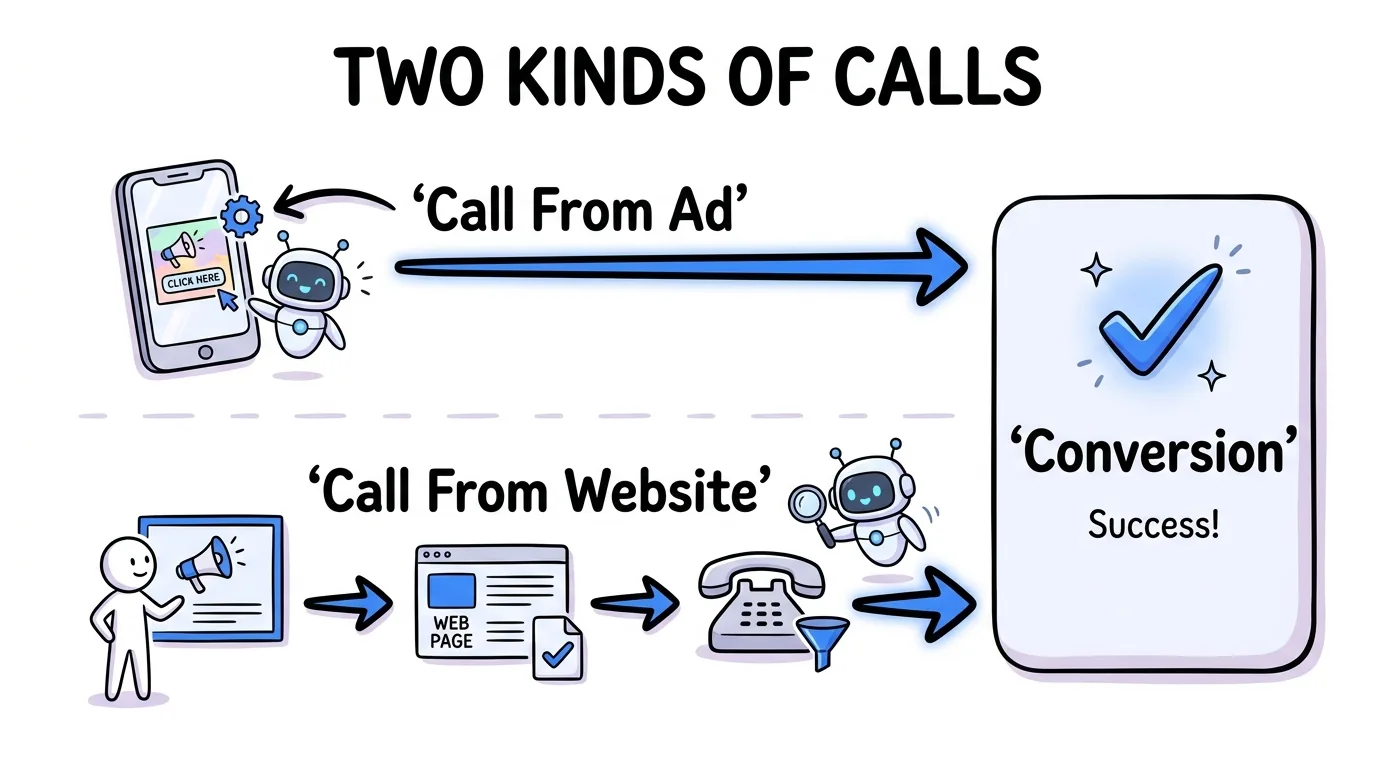
Before setting anything up, know that Google Ads call tracking covers two different calls, and they are measured differently. Confusing them is the most common setup mistake.
- Calls from the ad: A searcher taps the phone number on your call asset or call ad and dials directly. Google's built-in call reporting handles these with a forwarding number.
- Calls from your website: A searcher clicks your ad, lands on your site, browses, then calls the number on the page. Google's built-in reporting cannot see these; you need third-party call tracking with dynamic number insertion and a gclid import.
Most accounts get both kinds of calls, so a complete setup tracks both. For the underlying mechanics of how any call gets attributed, see how does call tracking work.
Method 1: Google's Built-In Call Reporting
Google's built-in call reporting, sometimes called Google call tracking, is free and lives inside your Google Ads account. When you turn it on, Google assigns a forwarding number to your call assets (formerly Google Ads call extensions) and call ads. As Google's call reporting documentation explains, it records call duration, start time, caller area code, and whether the call connected.
You can then count calls that last past a minimum duration as conversions, or let Google's AI analyze call recordings to flag high-quality leads. Per Google's phone call conversion tracking guide, this is managed at the account, campaign, or ad-group level. The limit: built-in reporting only sees calls placed directly from the ad, not from your website. It is the right starting point, but rarely the whole picture.
Method 2: Third-Party Call Tracking with gclid Import
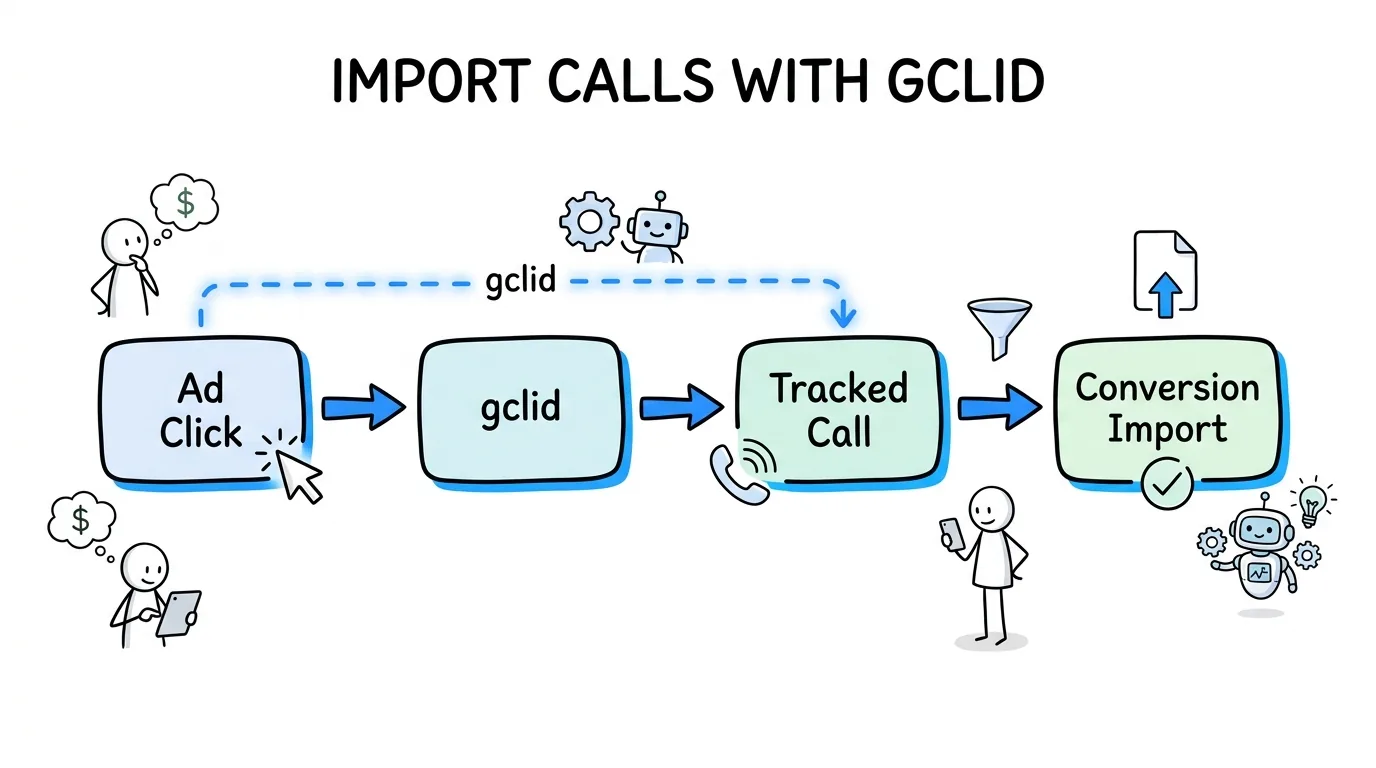
Third-party call tracking fills the gap built-in reporting leaves: calls that happen on your website after the click. It uses dynamic number insertion to show each visitor a tracking number tied to their gclid, the click identifier Google attaches to every ad click.
When the visitor calls, the platform records the call and imports it back into Google Ads as a conversion, carrying the gclid so the call is credited to the exact campaign, ad group, and keyword. This is how you attribute a $200 closed call to the specific keyword that earned it. Dynamic number insertion is the engine here, and a properly configured setup does not hurt your rankings, as we cover in is call tracking bad for SEO. For the full DNI explainer, see dynamic number insertion.
How to Set Up Google Ads Call Tracking
Setting up Google Ads call tracking is a short sequence once you know which calls you are after. Do the built-in layer first, then add third-party tracking for website calls.
- Turn on call reporting in your Google Ads account settings so forwarding numbers are assigned to call assets and call ads.
- Create a calls conversion action and set the minimum call duration that counts as a conversion (60 to 120 seconds is common).
- Add call assets (formerly call extensions) at the account, campaign, or ad-group level, per Google's call assets guide.
- Install dynamic number insertion from a third-party call tracking platform on your landing pages to capture website calls.
- Connect the gclid import so website calls flow back into Google Ads as conversions with full keyword attribution.
Verify by placing a test call and confirming it appears in your conversions within a day. For the optimization mechanics that follow, keep reading.
Optimize for Calls with Smart Bidding
Tracking calls is only half the job; the payoff is letting Smart Bidding chase them. Google's automated strategies like Target CPA and Target ROAS optimize toward whatever you mark as a primary conversion action, so calls must be set as primary, not secondary.
Once "Calls from ads" and your imported website calls are primary conversions, Smart Bidding starts steering budget toward the searches, devices, and times of day that produce qualified calls instead of cheap clicks. For pay-per-call and pay-per-lead agencies, this is the difference between paying for traffic and paying for revenue. The same call data also feeds your marketing call tracking reports, so you can see which keywords drive billable calls.
Built-In vs Third-Party Call Tracking
The two methods are complementary, not competing. Built-in reporting is free and fast to enable; third-party call tracking adds the website-call coverage and keyword-level depth that Google's native tool lacks.
| Factor | Google Built-In Reporting | Third-Party Call Tracking |
|---|---|---|
| Cost | Free | Usage-based (per number and per minute) |
| Tracks calls from ads | Yes | Yes |
| Tracks website calls | No | Yes |
| Keyword-level attribution | Limited | Full, via gclid and DNI |
| Call recording and AI scoring | Basic | Advanced |
| Routing to buyers | No | Yes |
Note that call-only ads, the old standalone call format, have been wound down in favor of call assets, so build new campaigns around call assets rather than legacy call-only ads.
How Lead Distro AI Tracks Google Ads Calls
Lead Distro AI is built for pay-per-lead and pay-per-call agencies, plus lead brokers and lead buyers and sellers, so Google Ads calls and data leads run through one system. It performs dynamic number insertion, imports website calls back into Google Ads via the gclid, scores every call with AI in under a second, and routes qualified calls with four distribution methods (round robin, weighted, priority/waterfall, and ping-post).
"Most advertisers optimize Google Ads toward form fills and ignore the calls, which is backwards," says Rafael Hernandez, Founder and CEO of Lead Distro AI. "Once you import calls as conversions and mark them primary, Smart Bidding does the heavy lifting and your cost per real lead drops."
Plans start at $297 per month, with call tracking priced on usage (a per-number monthly fee plus a per-minute inbound rate) on top of the flat subscription, and a real-time P&L dashboard shows margin per campaign and buyer. Explore call tracking or see current pricing tiers.
Frequently Asked Questions
What is Google Ads call tracking?
Google Ads call tracking is the practice of measuring phone calls that come from your Google Ads campaigns and counting qualified calls as conversions. It has two layers: Google's built-in call reporting, which uses a free forwarding number to track calls placed directly from call assets and call ads, and third-party call tracking, which uses dynamic number insertion and a gclid import to capture and attribute calls that happen on your website after the ad click.
How do I track phone calls from Google Ads?
To track phone calls from Google Ads, turn on call reporting in your account settings, create a calls conversion action with a minimum duration, and add call assets so Google assigns forwarding numbers. For calls that happen on your website after the click, install dynamic number insertion from a third-party call tracking platform and connect the gclid import. That combination captures both calls from the ad and calls from your site, then counts qualified ones as conversions.
Does Google Ads call tracking work with Smart Bidding?
Yes. Once calls are tracked as conversions, set "Calls from ads" and your imported website calls as primary conversion actions. Smart Bidding strategies like Target CPA and Target ROAS then optimize your bids toward the searches, devices, and times that produce qualified calls. If calls are left as secondary conversions, Smart Bidding ignores them, so marking them primary is the step that makes Google Ads call tracking actually improve performance.
What are Google forwarding numbers?
Google forwarding numbers are unique phone numbers Google assigns to your call assets and call ads when call reporting is enabled. When someone calls the number, Google routes the call to your real business line while logging the call duration, start time, caller area code, and whether it connected. This built-in tracking is free and lets you count calls of a chosen duration as conversions, but it only covers calls placed directly from the ad, not from your website.
Is third-party call tracking worth it for Google Ads?
For most advertisers, yes. Google's built-in reporting misses calls that happen on your website after the click, which are often the majority. Third-party call tracking uses dynamic number insertion and a gclid import to attribute those calls down to the keyword, enables call recording and AI scoring, and can route calls to buyers. The usage-based cost is typically small next to the value of attributing and optimizing toward calls that close.
How does Lead Distro AI track Google Ads calls?
Lead Distro AI runs dynamic number insertion on your landing pages, captures website calls with the gclid, and imports them into Google Ads as conversions with full keyword attribution. It scores each call with AI in under a second and routes qualified calls with four distribution methods. Calls and data leads share one buyer network and a real-time P&L dashboard. Plans start at $297 per month, with call tracking priced on usage on top of the flat subscription.
The Bottom Line
Google Ads call tracking is two layers working together: Google's free built-in reporting for calls from the ad, and third-party call tracking with dynamic number insertion and a gclid import for calls from your website. Set both up, mark calls as primary conversions, and let Smart Bidding optimize toward the searches that ring the phone. For pay-per-call and pay-per-lead agencies, that is how Google Ads stops paying for clicks and starts paying for revenue.
Want to track Google Ads calls and route them to buyers automatically? Start your 7-day free trial of Lead Distro AI or take the product tour to see call tracking, scoring, and routing in action.
About the Author
Founder & CEO of Lead Distro AI & Great Marketing AI
UC Berkeley graduate and former software engineer at Microsoft. Rafael built Lead Distro AI after managing over $10M in ad spend for performance marketing agencies (pay-per-lead and pay-per-call), including running campaigns for Neil Patel. He combines deep software engineering expertise with hands-on performance marketing experience to build tools that help these agencies scale profitably.
About Lead Distro AI
Lead Distro AI: AI-Powered Lead Distribution & Call Tracking That Maximizes ROI
The modern platform for pay-per-lead and pay-per-call agencies. Route, score, and deliver leads with AI-powered automation and real-time P&L tracking. Built for performance marketing agencies and lead buyers across legal, insurance, mortgage, solar, and home services verticals.
4 Distribution Methods
Waterfall, Round Robin, Weighted, Ping-Post
Ping-Post Auctions
Real-time bidding with sub-second routing
Real-Time P&L Reporting
Track revenue, costs, and profit per campaign
Call Tracking
Assign tracking numbers, record calls, and attribute conversions
AI Lead Scoring
Score every lead before routing to maximize conversion
Partner Portal
Self-serve dashboard for buyers to track leads