Lead Buyer Portal Features: 7 Must-Haves for Pay-Per-Lead Agencies
Evaluating lead buyer portal software? These 7 lead buyer portal features separate platforms that scale from ones that add inbox work. See how Lead Distro AI stacks up.

Rafael Hernandez
Founder & CEO
Ex-Microsoft SWE · $10M+ PPL ad spend
I hope you enjoy reading this blog post. If you want to try Lead Distro AI for free, click here.
Author: Rafael Hernandez | Founder & CEO of Lead Distro AI
Last Updated: June 6, 2026
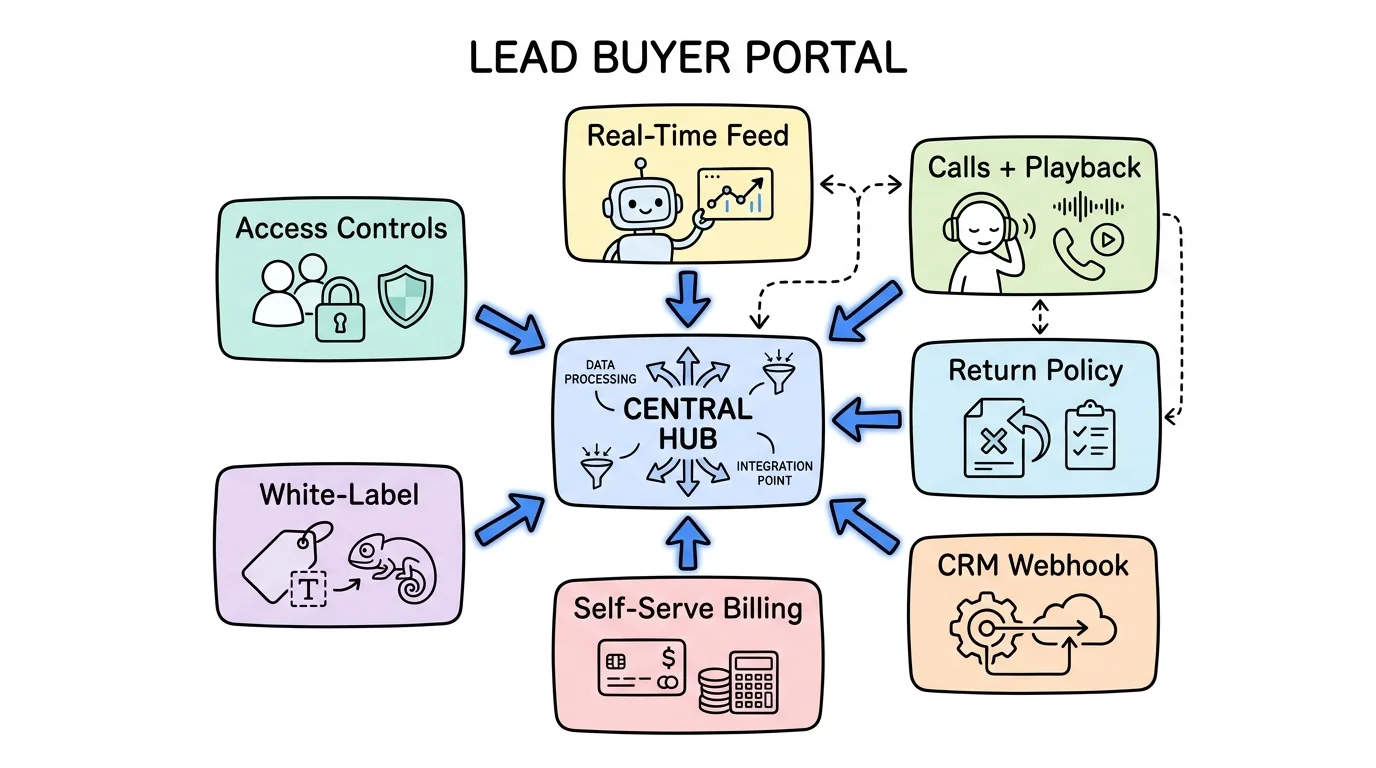
The essential lead buyer portal features are a real-time lead feed with status visibility, call recordings with playback, a configurable return policy, a CRM outcome webhook for two-way sync, self-serve billing with auto-recharge, white-label branding, and per-buyer access controls. Every serious lead buyer portal software platform should ship all seven. Most ship two or three, leaving agencies to fill the gaps with spreadsheets, email threads, and manual reconciliation.
According to Grand View Research, the global lead management market reached $3.5 billion in 2025 and is projected to grow at a 12.3% CAGR through 2030. As more agencies move from email-based lead delivery to structured platforms, buyers increasingly expect a real-time, self-serve portal that matches what they already use in their own CRM. If your lead management portal makes buyers email you to check a lead status, request a credit, or update a card, you are building friction into every client relationship. The seven features below are the minimum bar for a portal that actually runs itself.
This post evaluates features, not product definitions. If you want to understand what a lead buyer portal is from the ground up, start with our lead buyer portal overview first, then return here.
Key Takeaways
- A real-time lead feed is table stakes: buyers should see every delivered lead the moment it routes to them, with full detail and status, not a daily CSV.
- Call recordings with playback belong in the portal: for pay-per-call agencies, the Calls tab is where disputes live and where buyers confirm quality before submitting a return.
- Return policies need to be configurable per buyer: a blanket 48-hour window fits some buyers and destroys the relationship with others. The portal must let you set distinct rules.
- CRM Outcome Webhooks close the attribution loop: when a buyer marks a lead "converted" in Salesforce, HubSpot, or GoHighLevel, that signal should flow back to your platform automatically.
- Self-serve billing with auto-recharge removes a daily ops task: buyers should be able to add funds, set an auto-recharge threshold, and pull invoices without emailing you.
- White-label portals protect your brand margin: buyers who see a generic platform URL start asking how much the platform costs. Your branded URL keeps the relationship yours.
- Per-buyer access scoping prevents data leaks: one buyer should never be able to see another buyer's leads, pricing, or account details.
1. Real-Time Lead Feed
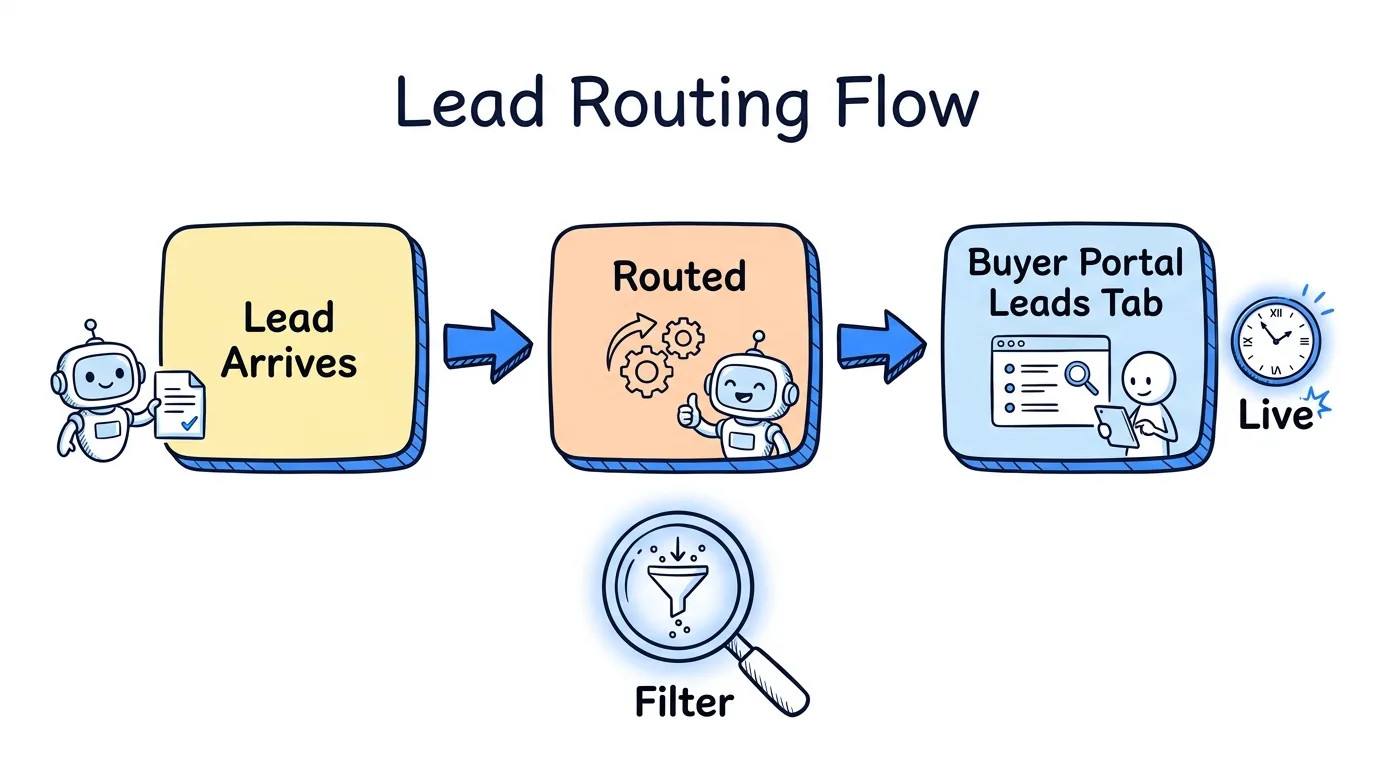
The lead buyer portal must surface every delivered lead in real time. Buyers should see lead status, submission timestamp, source, and full contact detail the moment a lead routes to them. A portal that batches leads by email or requires a page refresh to see new arrivals is not a portal: it is a reporting lag disguised as software.
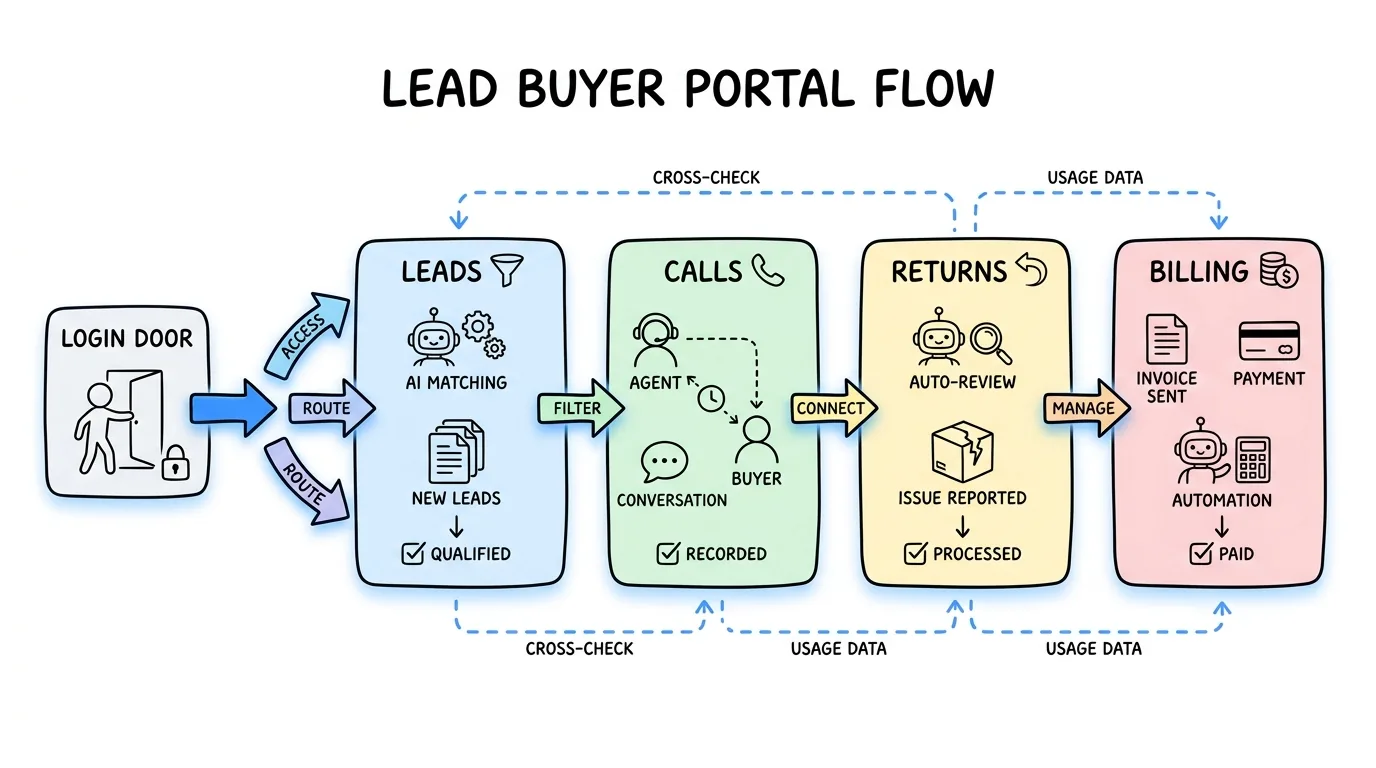
In Lead Distro AI, the Leads tab shows every lead delivered to that buyer with filters by date range, status, and source. Lead status updates as returns are processed, so buyers always see an accurate picture of their account without calling or emailing your team. The status field is the dispute-prevention layer: when a buyer says a lead never arrived, the Leads tab is the paper trail.
For agencies running ping-post distribution, the real-time feed also confirms which leads were accepted at the ping stage versus which were posted and rejected, giving buyers full visibility into the bid logic that affects their volume.
2. Call Recordings with Playback
For pay-per-call agencies, calls are the product. A lead management portal that delivers call data without recordings is delivering half the information a buyer needs to evaluate quality, dispute a charge, or coach their own sales team.
The Calls tab should let buyers listen to every call routed to them directly inside the portal. Playback eliminates the back-and-forth of exporting audio files or asking your team to forward recordings. Duration, timestamp, caller ID, and call outcome should appear alongside the audio so buyers can filter by the calls worth reviewing rather than listening to the full queue.
Lead Distro AI ships a Calls tab with in-portal playback. Every inbound call that routes to a buyer appears with its duration, timestamp, and a play button. Buyers working in pay-per-call verticals like insurance, legal, or home services use this tab to self-audit call quality before submitting a return, which reduces frivolous disputes and speeds up legitimate credits.
3. Configurable Return Policy
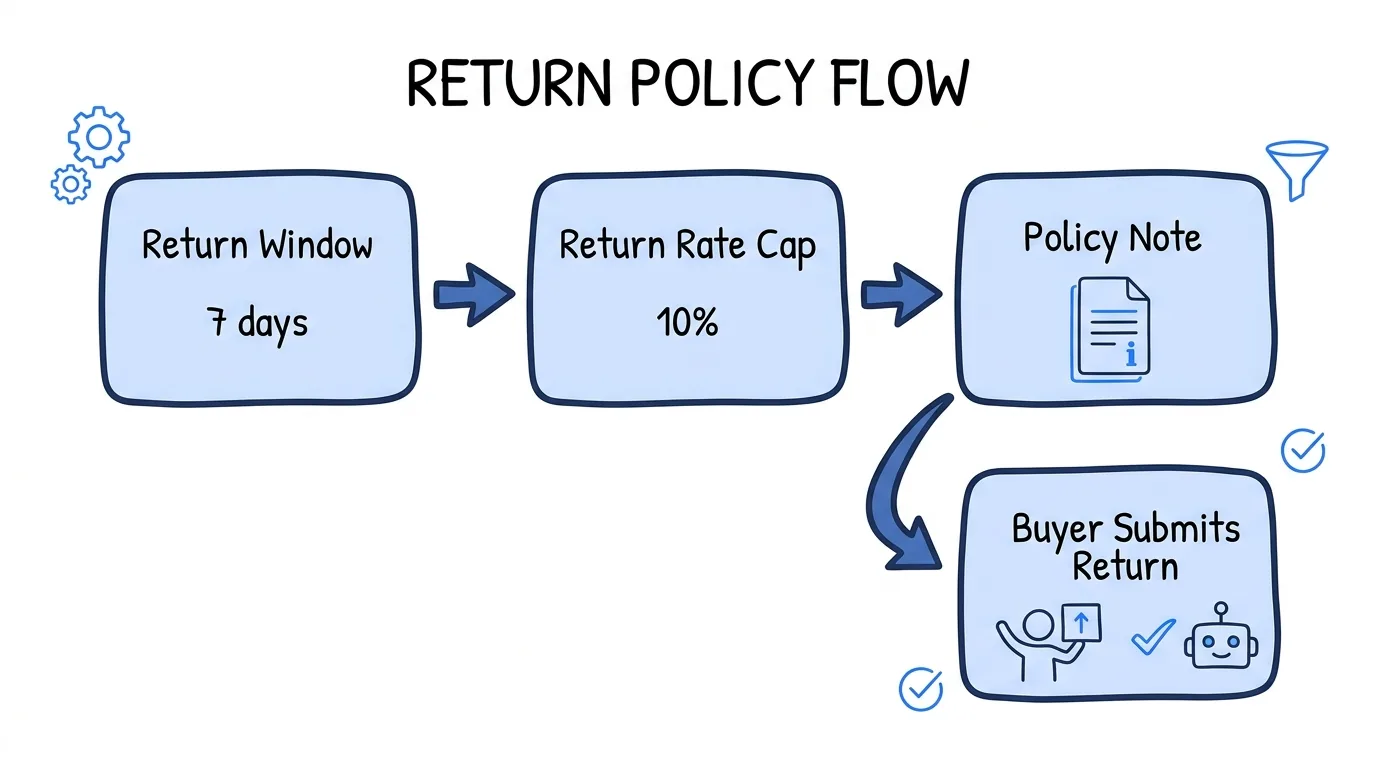
A return policy is one of the highest-friction points in any lead buyer relationship. If your lead buyer portal software enforces a single blanket return window for all buyers, you will spend hours every month adjudicating edge cases. The portal must let you configure return rules per buyer, not per platform.
The configurable parameters that matter are: whether returns are enabled for that buyer at all, the return window in days, a return rate cap as a percentage of delivered leads, and a policy note the buyer sees before they submit. That policy note is underrated: displaying your written return policy inside the submission flow eliminates "I didn't know" disputes almost entirely.
Lead Distro AI's return settings are per-buyer. You toggle returns on or off, set the window, and write a policy note that appears on the return form. When a buyer submits a return, the amount credits back to their wallet automatically if the return is within policy, with no manual reconciliation on your end. Our lead return policy guide walks through how to structure a policy that protects margin without alienating buyers.
4. CRM Outcome Webhook
The gap between what a buyer's CRM knows and what your platform knows is where attribution breaks down. A buyer converts a lead in Salesforce three days after delivery. Without a feedback loop, you have no idea which lead types are converting and which are not. A lead distribution portal that collects outcome data passively, through periodic exports or manual uploads, is always working with stale signals.
A CRM Outcome Webhook lets the buyer configure an endpoint on their CRM side that fires when lead status changes: contacted, qualified, converted, lost. That signal posts back to your platform automatically, enriching every lead record with the outcome the buyer observed. No login required. No export. No email.
Lead Distro AI provides a per-buyer CRM Outcome Webhook that works with Salesforce, HubSpot, GoHighLevel, and Zapier. The buyer configures the webhook once, and every status update they make in their own CRM flows back to the lead record in Lead Distro AI. This closes the lead distribution software attribution loop without requiring any behavioral change from the buyer after the initial setup. For agencies that want to refine routing over time, outcome data by buyer is how you identify which buyers convert which lead types best.
For a deeper look at how lead distribution connects to CRM systems, the what is lead distribution software guide covers the full integration architecture.
5. Self-Serve Billing with Auto-Recharge
Manual billing is the most consistent operational cost in a lead distribution business. Buyers running low on wallet balance send an email, you invoice, they pay, you update the account, you confirm. That sequence happens dozens of times per month at scale. A client portal for lead agencies that does not handle billing self-serve is creating a support ticket for every payment.
The billing panel should let buyers add a card on file, set an auto-recharge threshold (for example, add $500 when the wallet drops below $100), view their wallet balance in real time, pull invoices, and see a full transaction history without contacting your team. Auto-recharge is the feature that eliminates the "my account ran out" conversation: leads keep routing because the wallet stays funded automatically.
Lead Distro AI combines billing and portal access in a single tab. Buyers manage their card, set auto-recharge rules, and pull invoices in the same place they view leads and calls. One-time charges and manual top-ups from your side are also visible in the transaction history, so the buyer sees the full financial picture of their account. Start your 7-day free trial (credit card required) to see the billing panel in action.
6. White-Label Branding
When a buyer logs into a portal hosted on your competitor's domain, two things happen. First, they see a brand that is not yours. Second, they start wondering what the platform charges and whether they can access it directly. A lead buyer portal hosted under your own domain, with your logo and your name, keeps the buyer relationship squarely with you.
White-label should cover at minimum the portal URL (a custom subdomain on your own domain), your logo in the header, and your brand name throughout the interface. Ideally it also extends to outbound emails: billing confirmations, return approvals, and lead delivery notifications should arrive from your domain, not the platform's.
Lead Distro AI lets agencies brand the buyer portal with their own logo and serves it from a subdomain on the agency's domain. Buyers see the agency's brand at every touchpoint inside the portal, including the login page, the Leads tab header, and billing notifications. The product tour shows the full white-label experience across portal and email. For agencies positioning themselves as the software layer in their buyer relationships, this feature is not cosmetic: it is what separates a reseller from a platform operator.
7. Per-Buyer Access Controls
A lead distribution portal serving multiple buyers has one non-negotiable requirement: what buyer A sees must be completely invisible to buyer B. Access scoping is not a premium feature. It is the minimum condition for running a multi-buyer operation safely.
Per-buyer access controls enforce that each login sees only the leads routed to that account, only the calls delivered to that buyer, only that account's billing and wallet, and only that buyer's return history. Nothing from other accounts bleeds through, regardless of how many buyers share the same platform instance.
Lead Distro AI enforces buyer-level data isolation at the database query layer, not just the UI layer. Each buyer's credentials scope every API call to their account, so a buyer cannot access another buyer's data by manipulating a URL or API endpoint. This matters most for agencies managing buyers in the same vertical: two insurance buyers on the same platform must never see each other's leads, pricing, or return rates.
Comparing Lead Buyer Portal Software
| Feature | Lead Distro AI | Generic CRMs | Basic Lead Tools |
|---|---|---|---|
| Real-time lead feed | Yes | Partial | Email only |
| Call recordings + playback | Yes | No | No |
| Configurable return policy | Per-buyer rules | Manual process | No |
| CRM Outcome Webhook | Salesforce, HubSpot, GHL, Zapier | Varies | No |
| Self-serve billing + auto-recharge | Yes | Invoice-based | No |
| White-label portal | Custom subdomain + logo | No | No |
| Per-buyer access controls | Database-level isolation | Role-based | No |
| Starting price | $297/month | Varies | Free/freemium |
| Free trial | 7 days (credit card required) | Varies | No |
FAQ
What features should I look for in a lead buyer portal?
The seven features that separate a professional lead buyer portal from a basic reporting tool are: a real-time lead feed with status visibility, call recordings with in-portal playback, a configurable return policy with per-buyer rules, a CRM outcome webhook for two-way data sync, self-serve billing with auto-recharge, white-label branding on a custom subdomain, and database-level per-buyer access controls. Platforms that ship all seven eliminate most of the manual work that slows down agencies managing multiple buyers.
How does a CRM outcome webhook work in a lead buyer portal?
A CRM outcome webhook is a URL the buyer configures on their CRM side. When the buyer updates a lead status in Salesforce, HubSpot, GoHighLevel, or a Zapier workflow, the CRM fires a POST request to that URL. The lead distribution platform receives the payload, matches it to the original lead record, and updates the outcome field. No manual export or login is required from the buyer. The result is that your platform knows which leads converted without any additional workflow from either side.
Can a lead buyer portal handle pay-per-call as well as pay-per-lead?
Yes. A full-featured lead management portal should handle both. For pay-per-call, the portal needs a Calls tab with audio playback, call duration, timestamp, and caller ID. For pay-per-lead, the Leads tab with status and return request functionality covers the core use case. Lead Distro AI serves both pay-per-lead and pay-per-call agencies from the same portal, routing leads into the Leads tab and inbound calls into the Calls tab under the same buyer login.
What is auto-recharge in a lead buyer portal billing panel?
Auto-recharge is a billing rule the buyer sets: when the wallet balance drops below a defined threshold, the platform automatically charges the card on file for a preset amount. For example, a buyer might set auto-recharge to add $500 when the balance falls below $100. This keeps leads routing without interruption and removes the need for manual top-up requests. It is one of the highest-impact self-serve billing features for agencies managing multiple active buyers simultaneously.
How does white-labeling work in a lead buyer portal?
White-labeling means the portal runs under the agency's own brand rather than the platform's. At minimum this covers a custom subdomain (for example, clients.youragency.com instead of app.leaddistro.ai), the agency's logo in the portal header, and the agency's name throughout the interface. A fully white-labeled portal also sends billing confirmations and return approval emails from the agency's domain, so buyers never see the underlying platform name. Lead Distro AI supports custom subdomain and logo upload for every agency account.
What is the difference between a lead buyer portal and a CRM?
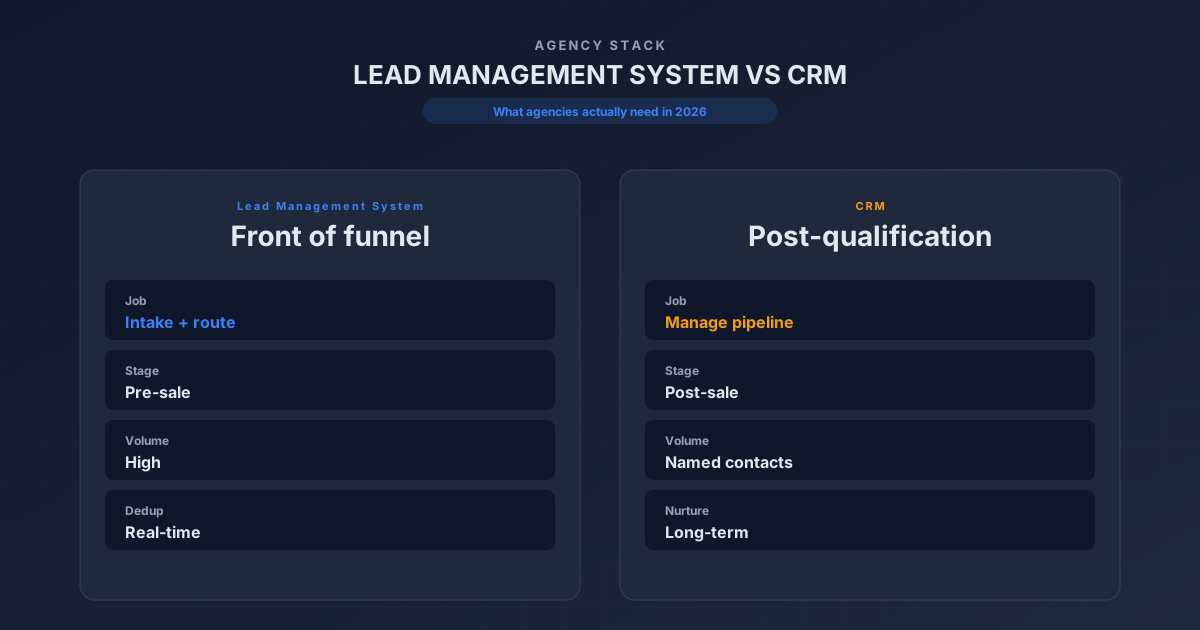
A CRM tracks the buyer's own pipeline: contacts, deals, and outreach. A lead buyer portal is the seller-side interface: it shows the buyer only the leads and calls that the lead distribution platform has routed to their account, along with return and billing tools. The two systems complement each other. A CRM outcome webhook connects them: the buyer manages conversion data in their CRM, and the outcome signal posts back to the lead distribution platform automatically, enriching the seller's routing data without requiring a separate login.
Conclusion
The seven lead buyer portal features covered here, including a real-time lead feed, call recordings, configurable return policies, CRM outcome webhooks, self-serve billing, white-label branding, and per-buyer access controls, are the standard any serious lead buyer portal software should meet. Platforms that fall short on even two or three of these features push the operational cost back onto the agency in the form of support emails, manual credits, and reconciliation work.
Lead Distro AI ships all seven out of the box. If you are evaluating lead management portal options for a pay-per-lead or pay-per-call operation, see it in action via the product tour or start your 7-day free trial (credit card required) and configure a buyer portal for your first client in minutes.
Ready to give your lead buyers a real-time portal with call playback, self-serve billing, and CRM sync? Start your 7-day free trial (credit card required) and route your first lead in under 30 minutes.
About the Author
Founder & CEO of Lead Distro AI & Great Marketing AI
UC Berkeley graduate and former software engineer at Microsoft. Rafael built Lead Distro AI after managing over $10M in ad spend for performance marketing agencies (pay-per-lead and pay-per-call), including running campaigns for Neil Patel. He combines deep software engineering expertise with hands-on performance marketing experience to build tools that help these agencies scale profitably.
About Lead Distro AI
Capture, Route, and Sell Every Lead, Call, and Appointment
Capture, route, and sell leads, calls, and appointments from one platform, with funnels, call tracking, ping-post, and billing built in. Set it all up in minutes by chatting with AI.
Funnels
Quiz, form, appointment, VSL, and webinar templates
Call Tracking
Tracking numbers, call recordings, and per-call billing
4 Distribution Methods
Priority/Waterfall, Round Robin, Weighted, Ping-Post
Ping-Post and Live Bidding
Sell each lead and call to the highest bid
Real-Time P&L
Revenue, cost, and profit per campaign
Partner Portal
Your Destinations see their own leads and results