What Is a Lead Buyer Portal? Lead Distro AI's Buyer Portal Explained
A lead buyer portal lets clients log in to see leads, calls, returns, and billing. Here is exactly what the Lead Distro AI buyer portal does.

Rafael Hernandez
Founder & CEO
Ex-Microsoft SWE · $10M+ PPL ad spend
I hope you enjoy reading this blog post. If you want to try Lead Distro AI for free, click here.
Author: Rafael Hernandez | Founder & CEO of Lead Distro AI
Last Updated: June 2, 2026
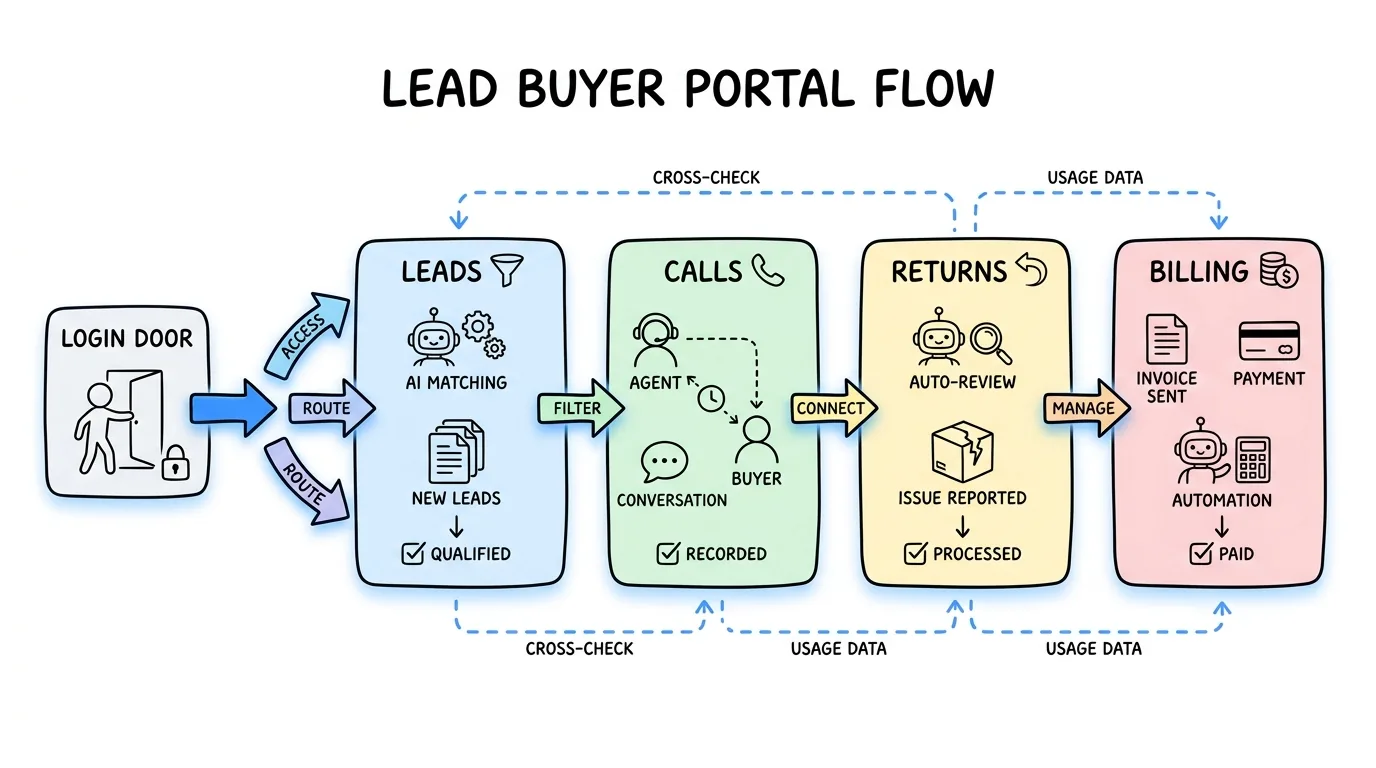
A lead buyer portal is a self-serve, branded login where the people who buy your leads see only the leads and calls routed to them, request returns within your rules, and manage their own billing. In Lead Distro AI, every buyer gets a portal: clients sign in, review delivered leads in a Leads tab, listen to call recordings in a Calls tab, submit returns under a policy you set, and add funds or manage a card on file without emailing you. If you sell or broker leads, the lead buyer portal is the surface your clients live in, and it is core to running a pay-per-lead or pay-per-call operation without spreadsheets and inbox back-and-forth.
According to Grand View Research, the global lead management market reached $3.5 billion in 2025 and is projected to grow at a 12.3% CAGR through 2030, and self-serve client access is one reason buyers expect more than a daily email of CSV rows. A lead buyer portal replaces that with a real-time, auditable system of record both you and your buyer can trust. Below, every capability described is a feature that already ships in Lead Distro AI today.
Key Takeaways
- A lead buyer portal is a branded client login where lead buyers see only their own leads and calls, submit returns, and manage billing themselves.
- Lead Distro AI gives every buyer a portal with a Leads tab, a Calls tab with playback, configurable returns, and a merged Portal & Billing tab for wallet, cards, invoices, and transactions.
- Buyers can update lead outcomes from their own CRM using a per-buyer CRM Outcome Webhook, so Salesforce, HubSpot, GoHighLevel, or Zapier can mark leads converted without anyone logging in.
- Returns run on rules you control: toggle returns on or off per buyer, set a return window in days, and show a return policy note before the buyer submits.
- Billing is self-serve and brandable: wallet balance, auto-recharge, card on file, one-time charges, invoices, and your own logo, so the portal reads as your brand, not ours.
What is a lead buyer portal?
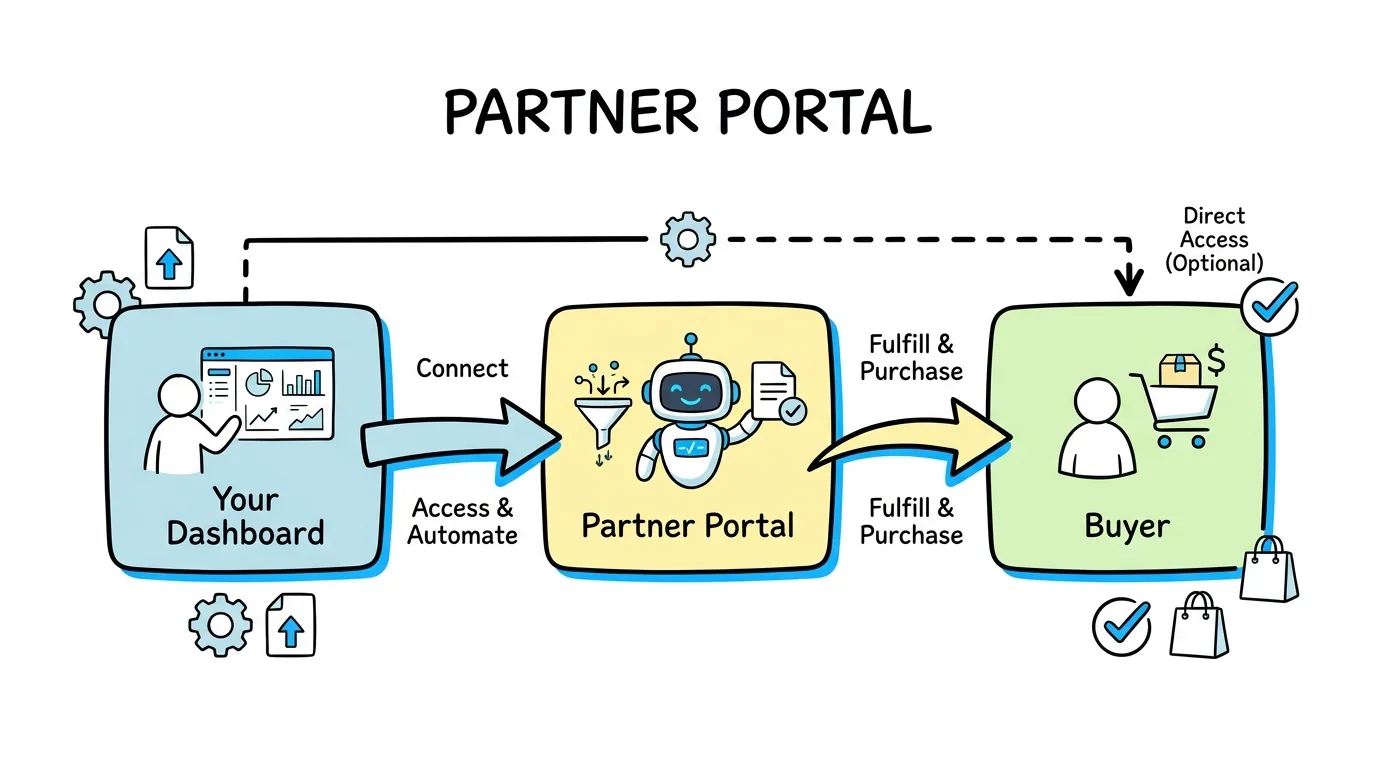
A lead buyer portal is a client-facing dashboard where a lead buyer logs in to see the leads and calls a seller or broker has delivered to them. Instead of receiving leads as raw email rows or a shared Google Sheet, the buyer gets a structured, real-time view with statuses, lead detail, and a paper trail. The portal is the buyer's side of a lead distribution platform: the seller manages campaigns, routing, and pricing on the agency side, while the buyer sees only what is theirs. Lead Distro AI renamed this login to the Partner Portal on June 23, 2026, and has since added custom outcome stages, a drag-and-drop pipeline board, and self-serve wallet top-ups on top of everything described below.
For lead sellers and lead brokers, this matters because trust and disputes drive churn. A buyer who can self-verify which leads arrived, when, and at what outcome stops asking "did you even send me that lead?" Lead Distro AI builds this portal for every buyer automatically, so you do not stand up a separate client app. You can explore the full client experience in the interactive product tour or start a free trial and preview a buyer's portal yourself.
What the Lead Distro AI buyer portal does
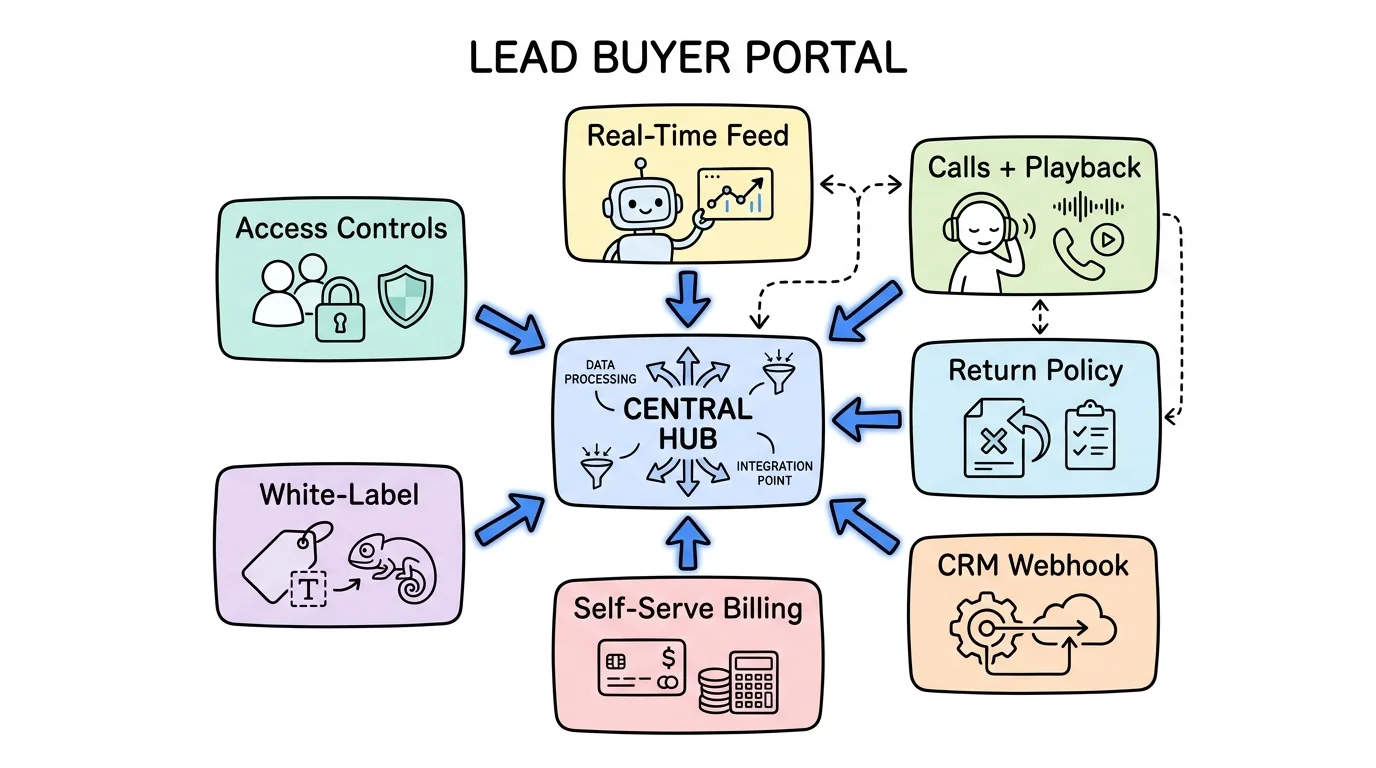
The Lead Distro AI buyer portal is split into a few focused tabs, each mirroring what your team uses internally. Buyers see only their own data, scoped by their buyer record, so one client never sees another client's leads.
Leads tab
The Leads tab is where buyers review every lead routed to them, open a side panel for full lead detail, and triage without leaving the list. Portal leads open in a side panel for fast review, and buyers can work the list or a kanban view. Each lead carries a status the buyer can act on, including setting an outcome (covered below). This is the buyer's primary working surface and the reason the portal replaces a CSV export.
Calls tab
For pay-per-call campaigns, the buyer portal Calls tab lets clients log in and see only the calls routed to them, with playback. It is a mirror of the Leads tab they already use. A buyer running phone campaigns can listen to each recording, confirm the call quality, and reconcile billed calls against what they received, all in the same portal where they manage leads.
Notes visible to the client
Your team can mark a note as visible to the client, and it then appears to the buyer in their portal. This is useful for flagging a specific detail to a buyer's sales rep, like a callback time or a qualifying note, without sending a separate message. Internal notes stay internal; only notes you explicitly share surface in the portal.
White-label branding
You can upload and manage your organization logo from Settings, and it appears next to your org name and in the buyer portal branding. The portal reads as your brand, not Lead Distro AI's, so clients experience your company's interface. You can also remove portal members directly from a buyer's portal settings without navigating to each member's profile.
How buyers use the CRM Outcome Webhook
The CRM Outcome Webhook is one of the most important pieces of the buyer portal because it lets buyers report lead outcomes without logging in at all. You generate the webhook on each client's Portal tab, and the buyer's Salesforce, HubSpot, GoHighLevel, or Zapier flow can mark leads converted automatically. When the buyer's CRM updates an outcome, the {{updated_by}} field renders the source, so you can tell at a glance whether a teammate or the buyer's CRM made the change.
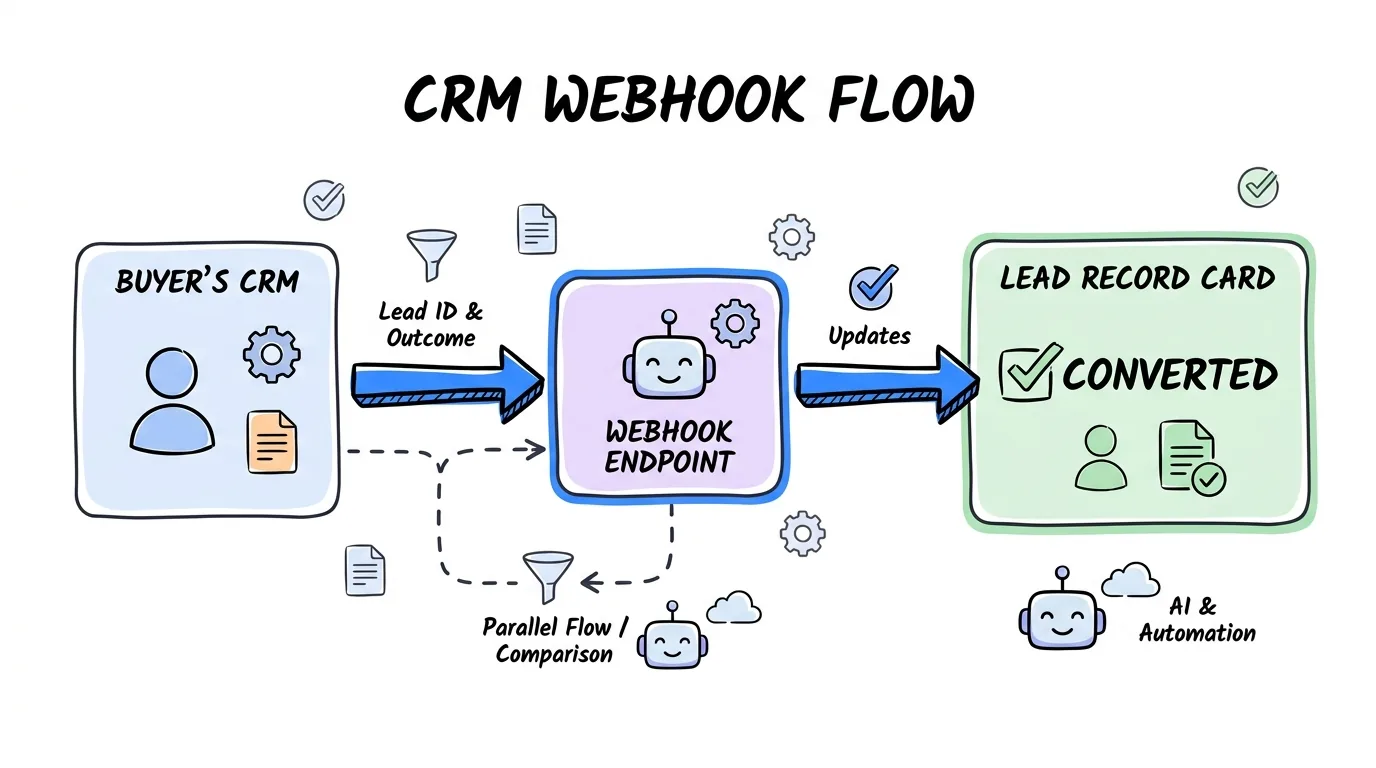
Here is how a buyer wires it up:
- Generate the secret. On the buyer's Portal tab, generate the CRM Outcome Webhook secret. You can also share a public setup link so the buyer's CRM team configures it without dashboard access.
- Point the CRM at the endpoint. The CRM posts to the buyer-outcome webhook URL with an
X-Buyer-Secretheader carrying the secret. A missing or wrong secret is rejected with a 401. - Send the payload. The body includes the original
lead_id(the lead UUID from delivery), anoutcomeofpending,converted, ornot_qualified, plus optionaloutcome_amount,note, and anidempotency_keyso retries are safe. - Map the lead id. Buyers store the
{{lead_id}}token from the delivery POST on their deal record, so the webhook matches the exact lead and skips phone or email matching entirely.
This closes the loop on conversions without any manual portal entry, which is the kind of integration depth that the lead distribution webhook guide covers from the inbound side.
Returns, card on file, and billing in the portal
The portal also handles the parts of a buyer relationship that usually live in email: returns and money. Each runs on rules you configure, so the buyer self-serves inside boundaries you set.
Returns the buyer controls
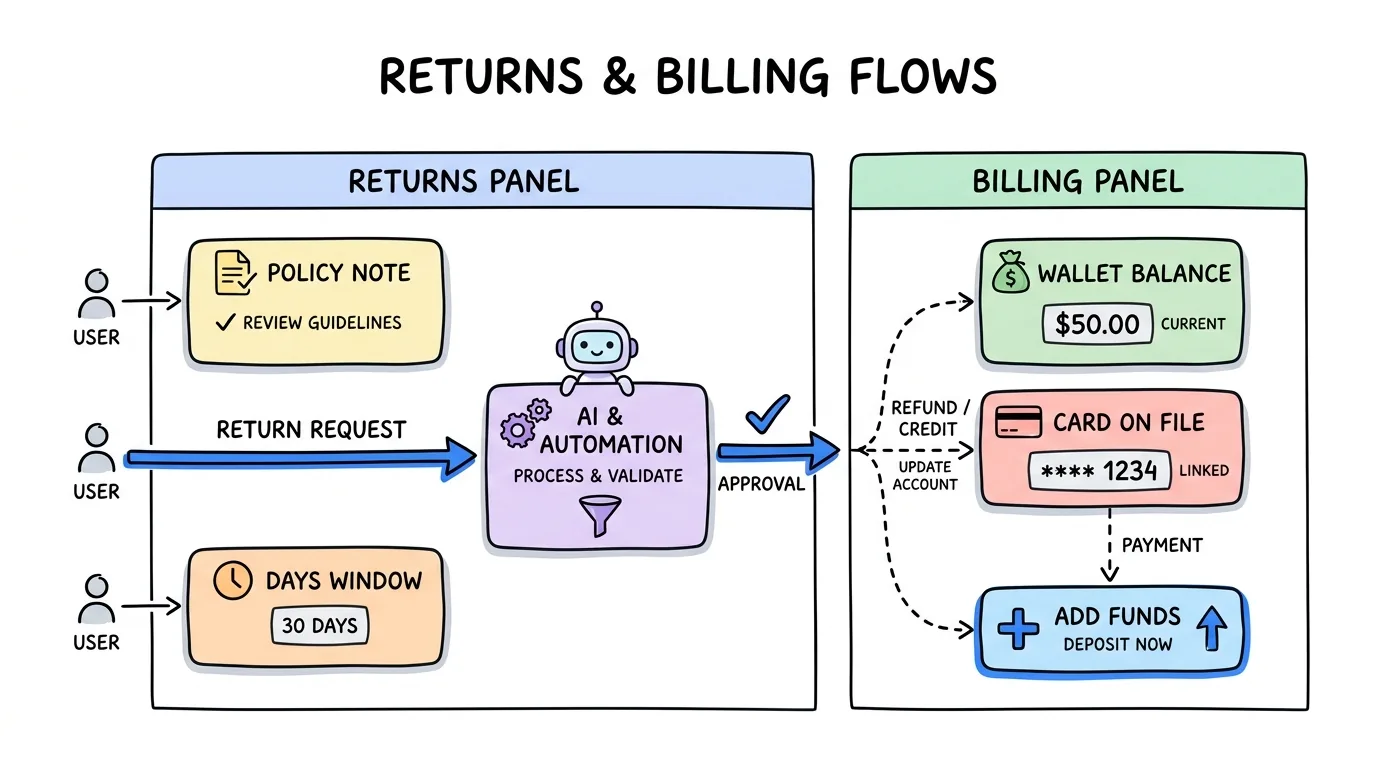
You decide whether each buyer can submit returns from their portal, toggling it on or off per buyer under Portal Settings. You can set a return window so returns are only accepted within a configurable number of days after delivery, and you can add a return policy note that buyers see before submitting a return. The note is your chance to explain qualifying criteria or time limits up front, so a buyer reads your rules at the moment they request a return. For how to design those rules from scratch, see our full guide to lead return policies, and to verify the consent behind each lead before it is ever returnable, read why buyers and sellers need TrustedForm.
Card on file and one-time charges
Buyers can add a payment method in the portal, and your team can add a card on file for them. From the Wallet & Billing card you can run a one-time Stripe charge on the buyer's card on file with the Charge card action, which does not touch their wallet balance and requires a memo that shows up in Wallet Transactions. Every saved card has a menu to remove it or set it as the default the system charges first.
Wallet, auto-recharge, and invoices
The portal merges Portal and Billing into one tab where you manage portal access, wallet, payment methods, billing config, invoices, and transactions together. Buyers can add funds and set up auto-recharge so their balance tops up automatically, and when a buyer owes you money the portal shows their outstanding balance, next auto-charge date, and an "Add funds to settle" button. Returned leads are automatically refunded back to the buyer's wallet. Plans start at $297 per month; see all pricing tiers for what each includes.
Buyer portal vs sending leads by email or spreadsheet
A lead buyer portal is a categorical upgrade over emailing leads or sharing a spreadsheet. The table below compares the day-to-day reality of each approach for a lead seller or broker.
| Capability | Lead buyer portal (Lead Distro AI) | Email / CSV delivery | Shared spreadsheet |
|---|---|---|---|
| Buyer sees only their own leads | Yes, scoped per buyer | Manual, error-prone | Hard to enforce |
| Call recordings with playback | Yes, Calls tab | No | No |
| Self-serve returns within your rules | Yes, per-buyer toggle + window + policy note | Email back-and-forth | No |
| Outcomes from buyer's CRM | Yes, CRM Outcome Webhook | Manual replies | Manual edits |
| Wallet, card on file, invoices | Yes, in-portal | Separate invoicing | Separate invoicing |
| Your branding | Yes, white-label logo | Your email only | None |
Email and spreadsheets break down at scale because there is no shared system of record, no audit trail, and no enforced rules. For a deeper look at the platform behind the portal, read our guide on what is lead distribution software and how lead broker software supports buyers and sellers at once.
FAQ
Does Lead Distro AI have a buyer/client portal?
Yes. Lead Distro AI gives every buyer a branded client portal automatically. When you add a buyer, they get a login to a portal scoped to their own data. Inside, they see a Leads tab with delivered leads, a Calls tab with call recordings and playback for pay-per-call campaigns, self-serve returns within rules you set, and a merged Portal & Billing tab for wallet balance, payment methods, invoices, and transactions. You can white-label the portal with your own logo so clients see your brand.
Can buyers update lead outcomes from their own CRM?
Yes. Each buyer can use a CRM Outcome Webhook, generated on their Portal tab, to push outcomes directly from Salesforce, HubSpot, GoHighLevel, or Zapier. Their flow posts the original lead id plus an outcome of pending, converted, or not_qualified, authenticated with an X-Buyer-Secret header. No one has to log into the portal to mark a lead converted, and the {{updated_by}} field shows the change came from the buyer's CRM rather than a teammate.
How do returns work in the Lead Distro AI buyer portal?
Returns are controlled per buyer. You toggle whether a buyer can submit returns from their portal under Portal Settings, set a return window so returns are only accepted within a configurable number of days after delivery, and add a return policy note that the buyer sees before submitting. When a return is accepted, the lead's cost is refunded back to the buyer's wallet automatically, so reconciliation happens without manual ledger edits.
Can lead buyers pay through the portal?
Yes. Buyers can add a payment method, fund a wallet, and turn on auto-recharge so the balance tops up automatically. Your team can also add a card on file and run a one-time Charge card action that bills the saved card without touching the wallet, with a required memo logged in Wallet Transactions. When a buyer owes a balance, the portal shows the amount due, the next auto-charge date, and an "Add funds to settle" button.
Is the buyer portal white-labeled?
Yes. You upload your organization logo in Settings, and it appears next to your org name and throughout the buyer portal branding, so clients experience your company's interface rather than Lead Distro AI's. You can manage portal members and remove access directly from a buyer's portal settings. The portal is the buyer-facing half of the platform, while your team manages campaigns, routing, and pricing on the agency side.
Conclusion
A lead buyer portal is the difference between a professional lead operation and a folder of emailed CSVs. The Lead Distro AI buyer portal gives every client a branded login to review their leads and calls, request returns within rules you control, report outcomes straight from their CRM, and manage their own billing. For lead sellers, brokers, and pay-per-lead or pay-per-call agencies, that self-serve transparency is what keeps buyers paying and stops disputes before they start. The portal ships with the platform, so there is nothing extra to build.
Want to see the buyer portal from your clients' side? Start your 7-day free trial and preview a buyer portal in minutes.
About the Author
Founder & CEO of Lead Distro AI & Great Marketing AI
UC Berkeley graduate and former software engineer at Microsoft. Rafael built Lead Distro AI after managing over $10M in ad spend for performance marketing agencies (pay-per-lead and pay-per-call), including running campaigns for Neil Patel. He combines deep software engineering expertise with hands-on performance marketing experience to build tools that help these agencies scale profitably.
About Lead Distro AI
Lead Distro AI: Capture, Route, and Sell Every Lead, Call, and Appointment
The modern platform for pay-per-lead and pay-per-call agencies. Route, score, and deliver leads with AI-powered automation and real-time P&L tracking. Built for performance marketing agencies and lead buyers across legal, insurance, mortgage, solar, and home services verticals.
4 Distribution Methods
Waterfall, Round Robin, Weighted, Ping-Post
Ping-Post Auctions
Real-time bidding with sub-second routing
Real-Time P&L Reporting
Track revenue, costs, and profit per campaign
Call Tracking
Assign tracking numbers, record calls, and attribute conversions
Lead Scoring
Score every lead before routing to maximize conversion
Partner Portal
Self-serve dashboard for buyers to track leads