Automated Lead Routing Rules for Agencies: Filters, Caps, and Priority
Learn how to set up automated lead routing rules for agencies: geo filters, daily caps, quality thresholds, time-of-day rules, and priority waterfall logic.

Rafael Hernandez
Founder & CEO
Ex-Microsoft SWE · $10M+ PPL ad spend

I hope you enjoy reading this blog post. If you want to try Lead Distro AI for free, click here.
Author: Rafael Hernandez | Founder & CEO of Lead Distro AI
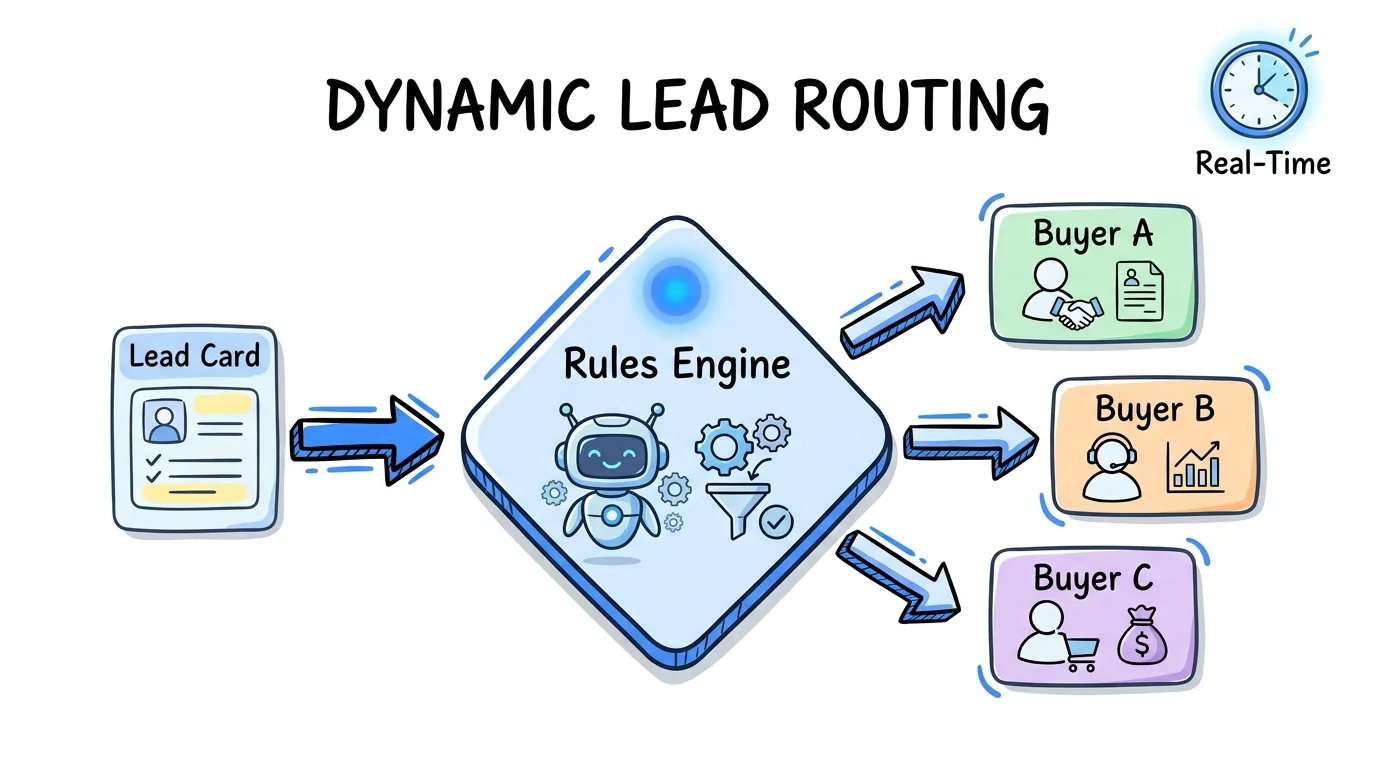
Automated lead routing rules are the conditional logic that tells your lead distribution platform which buyer receives each incoming lead, in what order, and under what constraints. For pay-per-lead agencies and lead brokers, these rules replace manual assignment entirely: every lead that enters the system is evaluated in milliseconds against a set of filters, caps, and priority sequences before being delivered to the matching buyer.
The stakes are high. A 2024 RevenueHero analysis of more than 1,000 B2B companies found that 63 percent never respond to inbound leads at all, and the average response time for those who do is over 29 hours. Manual routing is a primary cause. Automated lead routing rules eliminate that bottleneck by making the assignment decision before a human even sees the lead, typically in under one second.
This guide covers the five core rule types, the correct order to layer them, fallback logic when no rule fires, and a routing rule audit checklist you can use to find gaps in your current setup. The examples throughout use Lead Distro AI's routing rule builder, which applies these rule types natively across all four distribution methods.
Key Takeaways
- Five rule types drive most routing decisions: geo/state filters, daily and monthly caps, quality thresholds, time-of-day windows, and priority waterfall sequences. Layer them in that order.
- Cap management is the most commonly misconfigured rule. A buyer with a daily cap of 20 leads who has already received 19 will reject the 20th unless your platform enforces caps in real time before routing, not after.
- Fallback logic is not optional. Every routing setup needs a defined fallback buyer or a "park and retry" queue. Without it, leads that exhaust the waterfall vanish instead of being recovered.
- Ping-post routing applies rules before the auction. Geo and quality filters run on the partial ping payload, so buyers only bid on leads that match their criteria, reducing wasted bids and improving acceptance rates.
- A routing rule audit every 30 days prevents cap drift. Buyers change their capacity, geographic targeting, and quality requirements constantly. Stale rules cause rejected leads, lost revenue, and buyer churn.
- Lead Distro AI enforces all five rule types in one rule builder. No manual enforcement scripts or spreadsheet workarounds needed. Start with a 7-day free trial (credit card required, $297/mo after trial).
The 5 Core Automated Lead Routing Rule Types
Most agencies rely on some combination of these five rule types. The challenge is not implementing each one in isolation; it is layering them in the right order so they compound instead of conflict.
1. Geo and State Filters
Geo filters restrict which leads a buyer can receive based on the lead's geographic attributes: state, zip code, area code, DMA, or radius from a point. They are the first rule to evaluate because any lead that fails a geo filter should never enter the routing queue for that buyer at all.
A buyer who covers only California should have a state filter set to CA. If a lead arrives with state = TX, the system skips that buyer entirely and moves to the next in the waterfall. This is different from a rejection: the buyer never sees the lead. Getting this right prevents failed deliveries and buyer complaints about out-of-area leads.
Zip code filters are more granular and useful for local-service verticals like solar or home services, where a buyer's service area may cover 30 zip codes within a state but not the state as a whole. Some platforms also support radius filtering: "send this buyer any lead within 50 miles of ZIP 90210." Lead Distro AI supports state, zip, and area-code filters natively in the routing rule builder.
2. Daily and Monthly Cap Management
Cap rules set a ceiling on how many leads a buyer can receive in a given time window. Daily caps are the most common: "send Buyer A no more than 50 leads per day." Monthly caps layer on top: "send Buyer A no more than 800 leads this month."
The critical implementation detail is when the cap is enforced. Platforms that check caps at the time of delivery (rather than at the time of routing) can over-deliver by one or two leads during high-volume windows. Platforms like Lead Distro AI enforce caps in real time at the routing decision point, so a buyer who has received their 50th lead today is skipped on the 51st lead inquiry even if it arrives in the same second.
Buyer-level caps and campaign-level caps are distinct. A buyer might have a daily cap of 100 total leads but a campaign-level cap of 30 leads per day for a specific vertical. Both need to be enforced independently.
3. Quality Thresholds and Acceptance Criteria
Quality rules filter leads based on the data fields submitted with the lead: minimum age, required fields present, phone number validation, duplicate status, and quality score. These rules protect buyers from receiving leads that do not meet their acceptance criteria and protect your agency from returns and chargebacks.
Common quality filters include:
- Minimum age: "Only route leads where the submitter's age is 25 or older"
- Required fields: "Only route leads where phone, email, and state are populated"
- Duplicate detection: "Do not route if this phone number was submitted in the past 30 days"
- Quality score: "Only route to Premium Buyer if the score is above 72"
Lead Distro AI's lead scoring runs a quality score against your rules on every inbound lead before routing rules fire, so quality thresholds can reference the score rather than requiring manual field logic. That approach is meaningful in high-CPC verticals where each lead costs $30 to $150 to acquire.
4. Time-of-Day and Day-of-Week Windows
Time rules restrict routing to the hours when a buyer's team is available to follow up. Sending a legal lead to a law firm's intake team at 11 PM on a Sunday generates a low-quality follow-up interaction even if the lead itself is excellent. Routing within business hours improves buyer acceptance rates and reduces returns.
A time-of-day rule looks like: "Only route to Buyer B between 8 AM and 6 PM, Monday through Friday, in the buyer's local timezone." The timezone handling is where most implementations fail. A buyer in New York and a buyer in Los Angeles have a three-hour offset. A rule that fires at "8 AM EST" routes a lead to the Los Angeles buyer at 5 AM local time, which violates their availability window.
Lead Distro AI handles timezone normalization at the buyer profile level, so you define each buyer's hours in their local timezone and the platform converts at routing time. Leads that arrive outside a buyer's window are either held in a time-delayed queue or skipped in favor of a 24/7 fallback buyer.
5. Priority Waterfall and Weighted Sequences
Priority rules define the order in which buyers are offered a lead when multiple buyers match the geo, cap, quality, and time filters. The two most common implementations are waterfall (sequential) and weighted (probabilistic).
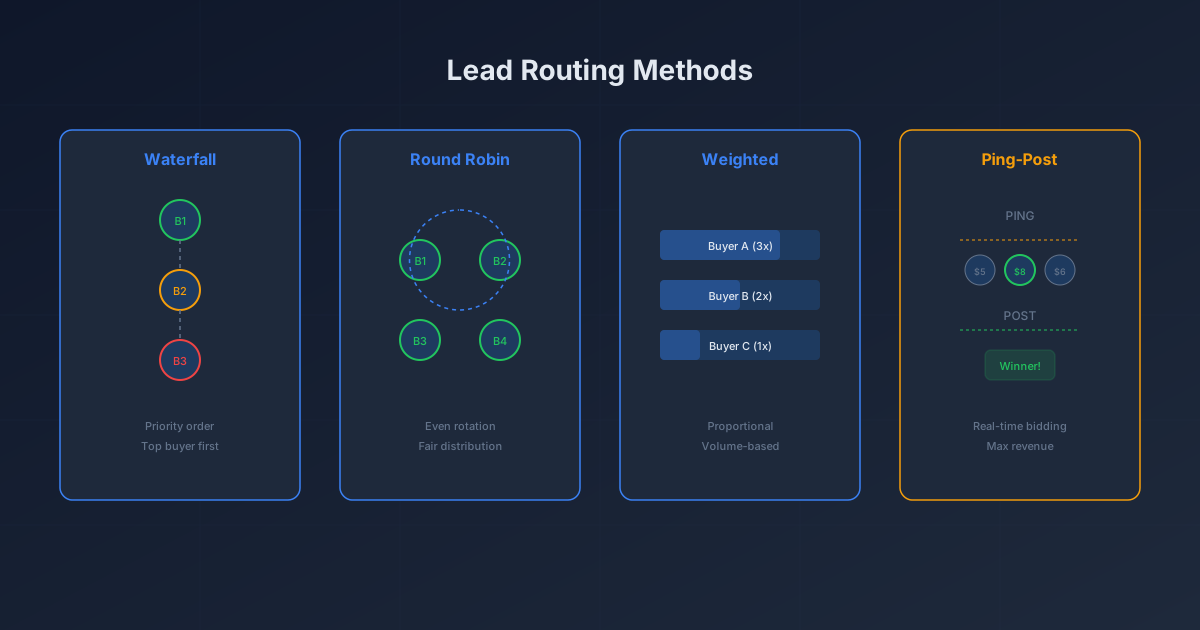
In a priority waterfall, buyers are ranked 1 through N. The lead is offered to Buyer 1 first. If Buyer 1 rejects or is capped, it goes to Buyer 2, and so on. Waterfall routing maximizes revenue per lead by offering it to the highest-paying buyer first, but introduces latency with each cascade tier. For a deeper look at how the four methods compare, read the best lead routing software for agencies comparison.
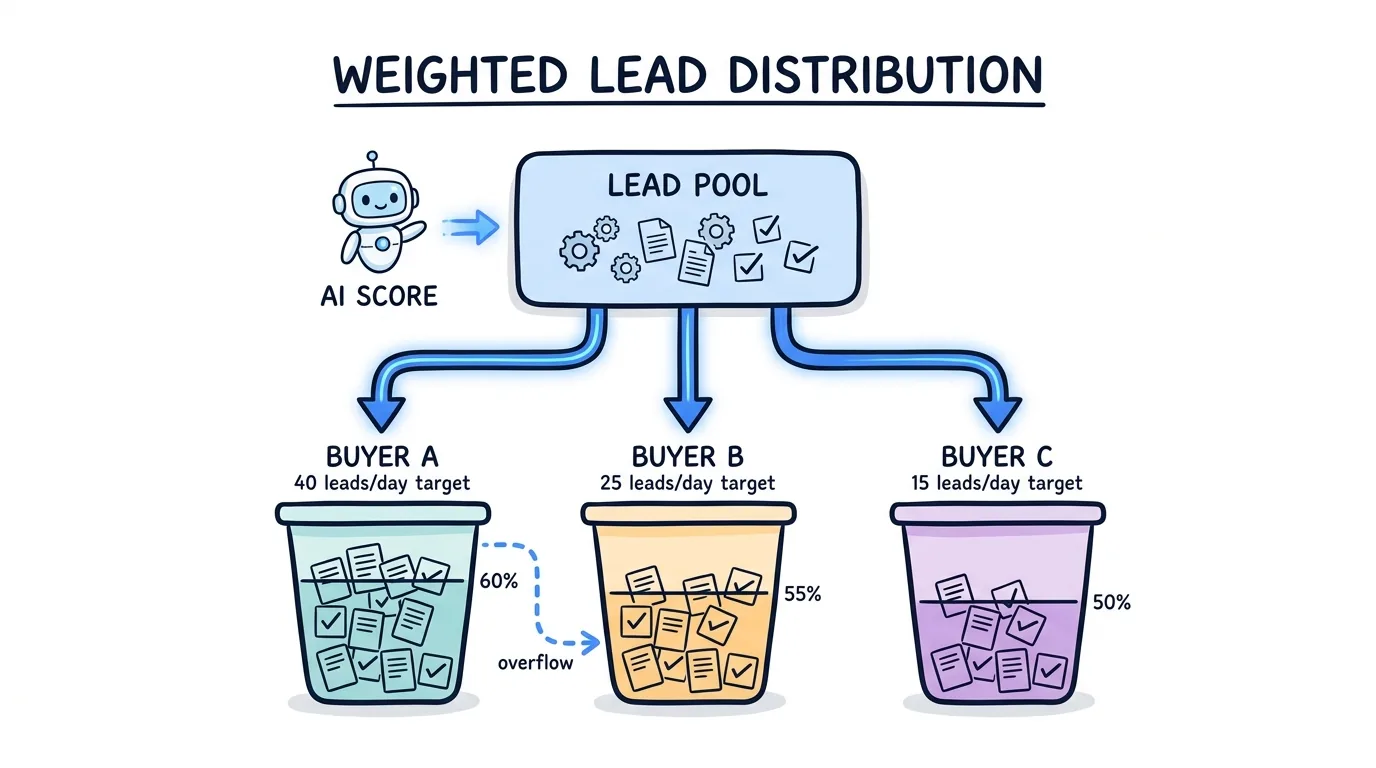
In weighted routing, buyers are assigned a percentage share: Buyer A gets 60 percent, Buyer B gets 30 percent, Buyer C gets 10 percent. The platform uses probabilistic assignment to land near those percentages at scale. Weighted routing is better for buyers who want consistent volume rather than maximum payout sequencing.
The Correct Layering Order
Applying routing rules in the wrong sequence wastes compute and produces unexpected results. The correct order for automated lead routing rules is:
- Geo filter (eliminate geographic mismatches first)
- Quality threshold (eliminate low-quality leads before checking caps)
- Cap check (confirm the buyer has capacity)
- Time-of-day window (confirm the buyer is available)
- Priority or weighted sequence (assign from the remaining eligible buyers)
Running caps before quality checks is the most common mistake. If you check whether a buyer has capacity before filtering out duplicate leads, you are consuming capacity for leads that would have been rejected anyway, causing eligible leads to be skipped due to false cap exhaustion.
What Happens When No Rule Fires: Fallback Logic
Every routing setup needs a defined response for when the waterfall is exhausted: no buyer matches, all buyers are capped, or all buyers are outside their time windows. Without fallback logic, those leads disappear from the system without being monetized.
Three standard fallback approaches exist:
Fallback buyer: A buyer configured to accept any lead that the primary waterfall cannot place, typically at a lower payout. Fallback buyers are often networks or exchanges that accept broad criteria. This is the simplest and fastest recovery option.
Park and retry queue: Leads that fail due to time-of-day constraints are held and re-entered into the routing queue at the buyer's next available window. This is appropriate for time-restricted buyers where the lead quality is high enough to be worth holding.
Reject with return code: The lead is returned to the source with a rejection code indicating why it was not placed. This is appropriate for leads that fail quality thresholds and should not be held or passed to a fallback buyer.
Lead Distro AI surfaces all three options in the campaign configuration and logs every fallback event so you can audit recovery rates by day and by vertical. Agencies that implement a fallback buyer typically recover 8 to 15 percent of leads that would otherwise be lost, which at $40 to $80 per lead compounds quickly.
Routing Method Comparison: Which Method to Use When
| Routing Method | How It Works | Best For | Latency | Revenue Potential |
|---|---|---|---|---|
| Round Robin | Distributes leads evenly across all buyers in sequence | Fair volume distribution, equal-weight buyer agreements | Sub-1 second | Moderate (equal payout) |
| Weighted | Assigns leads by percentage share (e.g., 60% / 30% / 10%) | Volume guarantees, tiered buyer agreements | Sub-1 second | Moderate to high |
| Priority Waterfall | Offers lead to Buyer 1 first, cascades on rejection | Maximizing revenue per lead, exclusive buyers | 1 to 40+ seconds (per cascade) | Highest |
| Ping-Post | Broadcasts partial lead to bidders; highest bidder gets full lead | Competitive verticals, real-time auction pricing | Sub-1 second (with bid window) | Highest in competitive markets |
For legal and insurance verticals with CPCs above $50, ping-post routing typically generates 20 to 40 percent more revenue per lead than round robin because buyers compete on price rather than receiving leads at a fixed payout. For home services and solar with tighter margins, weighted routing with a fallback buyer often produces better net revenue because the predictability allows buyers to commit to higher volume agreements.
Routing Rule Audit Checklist
Use this checklist every 30 days to identify gaps in your current automated lead routing rules setup. Each item represents a failure mode that causes silent revenue loss.
Geo Rules
- Every buyer has explicit state or zip code filters defined (no buyers set to "all states" unless intentional)
- Zip code lists have been updated within the past 60 days (service areas change)
- Area-code filters match the buyer's current coverage area, not historical coverage
Cap Management
- All daily caps reflect the buyer's current capacity commitment (not last quarter's agreement)
- Monthly caps are set and are being enforced independently from daily caps
- Cap utilization report reviewed: any buyer consistently at 100% cap is a upsell or expansion opportunity
Quality Thresholds
- Duplicate detection window is set (30 days is standard; adjust for vertical)
- Required fields list is current (if buyers have updated their acceptance criteria, your filters need to match)
- Quality score thresholds are calibrated to current acceptance rate data
Time-of-Day Windows
- Every buyer's operating hours are defined in their local timezone (not a single global timezone)
- Holiday and weekend availability has been confirmed with each buyer
- Time-window leads have a park-and-retry queue or fallback buyer configured
Waterfall and Fallback
- Every campaign has a fallback buyer or reject-with-return-code configured
- Waterfall tier order reflects current buyer payout agreements (highest payer at Tier 1)
- Fallback recovery rate is being tracked (target: 8 to 15% of leads that exhaust the primary waterfall)
- No gaps between waterfall tiers (Tier 2 buyer's acceptance criteria should cover what Tier 1 rejects, not a narrower set)
How Lead Distro AI Implements These Rules
Lead Distro AI's routing rule builder lets you configure all five rule types in a single interface without writing code or maintaining external scripts. Rules are applied in the correct sequence automatically: geo filter first, quality threshold second, cap check third, time window fourth, priority sequence fifth.
The platform logs every routing decision with the rule that fired and the reason for any skip or rejection, so you can audit why a specific lead was or was not delivered to a specific buyer. This is the operational visibility that agencies building these systems in spreadsheets or custom scripts consistently lack.
All four distribution methods (round robin, weighted, priority waterfall, and ping-post) support the same rule types, so you are not locked into a simpler rule set when you use ping-post. The product tour walks through a full campaign configuration including geo filters, daily caps, quality thresholds, and fallback buyer setup.
Pricing starts at $297 per month. Call tracking is usage-based on top of the platform subscription (per-number monthly fee plus per-minute rate for inbound calls). Start with the 7-day free trial (credit card required) to configure your first campaign and routing rules before committing.
What Is Lead Routing, and Why Do These Rules Matter
Lead routing is the automated process of assigning inbound leads to buyers or sales reps based on predefined rules. Automated lead routing rules are the specific conditions that govern each assignment decision. Without rules, routing software is just a relay: it moves leads from a source to a destination without intelligence.
Rules matter because no single buyer is the right match for every lead. A buyer covering California cannot serve a Texas lead. A buyer who has received their daily maximum cannot handle one more. A buyer whose team does not start until 9 AM EST cannot follow up on a lead that arrives at 6 AM. Automated lead routing rules enforce these constraints without human intervention, which is the only way to operate at volume.
The best lead distribution software platforms treat rule configuration as a first-class feature, not an afterthought. Agencies that invest in well-configured routing rules consistently outperform those using simpler "assign to next available" logic on acceptance rate, buyer retention, and net revenue per lead.
FAQ
What are automated lead routing rules?
Automated lead routing rules are conditional logic filters that a lead distribution platform evaluates for every inbound lead before assigning it to a buyer. Rules check attributes like geography, buyer capacity (daily and monthly caps), lead quality score, and the time of day. When a lead matches a buyer's rules, the platform routes it to that buyer. When no buyer matches, fallback logic handles the unplaced lead. The entire evaluation happens in under one second.
How do I set up lead routing rules for my agency?
Start with geo filters for each buyer (state or zip code), then add daily caps reflecting their agreed volume, then set quality thresholds (required fields, duplicate window, minimum quality score), then configure time-of-day windows in each buyer's local timezone, then sequence buyers in priority waterfall order with a fallback buyer at the end. Review this setup every 30 days because buyers change their capacity and coverage areas frequently, and stale rules cause rejected leads and revenue loss.
What is the difference between waterfall and ping-post routing rules?
In waterfall routing, rules are evaluated sequentially: the lead is offered to Buyer 1 first; if Buyer 1 rejects or is capped, it cascades to Buyer 2. Rules fire once per tier. In ping-post routing, a partial lead (the "ping") is broadcast to multiple buyers simultaneously, each of whom applies their own acceptance rules and bids a price; the highest bidder receives the full lead (the "post"). Ping-post routing applies geo and quality rules to the ping payload before buyers even respond, so only eligible buyers enter the auction.
Why do my buyers keep rejecting leads even after I set routing rules?
The most common causes are cap exhaustion (caps were set based on old volume agreements and have not been updated), quality mismatches (your quality threshold does not match what the buyer's system actually accepts), or timezone drift (time-of-day rules are set in the wrong timezone). Run a rejection reason report for the past 30 days and group rejections by reason code. Cap-related rejections mean you need to update the cap or add another buyer to the waterfall. Quality rejections mean your threshold needs to be raised to match the buyer's criteria.
How many routing rules should each buyer have?
Most buyers need four to six rules: a geo filter, a daily cap, a quality threshold (at minimum, required fields and duplicate detection), and a time-of-day window. Buyers with more complex requirements may add campaign-level caps, vertical-specific quality scores, or radius-based geo filters. The goal is specificity without over-engineering: every rule should correspond to a real acceptance criterion the buyer has communicated. Unused rules add latency and make troubleshooting harder when leads are rejected unexpectedly.
Does Lead Distro AI support all four routing methods with the same rules?
Yes. Lead Distro AI applies geo filters, cap management, quality thresholds, and time-of-day windows identically across round robin, weighted, priority waterfall, and ping-post routing. You do not have to rebuild your rule set when you switch from one method to another. The rule builder also supports fallback buyer configuration at the campaign level for all four methods.
Conclusion
Automated lead routing rules are what separate a lead distribution operation from a lead relay. The five rule types covered here (geo filters, cap management, quality thresholds, time-of-day windows, and priority waterfall sequences) handle the vast majority of routing decisions that agencies face at scale. Layering them in the correct order and auditing them monthly prevents the silent revenue loss that comes from stale caps, geographic drift, and fallback gaps.
Lead Distro AI builds all five rule types into a single rule builder with real-time cap enforcement, rule-based quality scoring, timezone-aware time windows, and fallback buyer configuration across all four distribution methods. Start your 7-day free trial and configure your first automated routing campaign today (credit card required, plans from $297/mo).
For a broader look at how the underlying distribution methods compare, read what is lead routing and our roundup of the best lead routing software for agencies.
Ready to configure automated lead routing rules for your agency? Start your 7-day free trial and build your first routing campaign in Lead Distro AI's rule builder, no code required. Credit card required; plans start at $297/mo.
About the Author
Founder & CEO of Lead Distro AI & Great Marketing AI
UC Berkeley graduate and former software engineer at Microsoft. Rafael built Lead Distro AI after managing over $10M in ad spend for performance marketing agencies (pay-per-lead and pay-per-call), including running campaigns for Neil Patel. He combines deep software engineering expertise with hands-on performance marketing experience to build tools that help these agencies scale profitably.
About Lead Distro AI
Lead Distro AI: Capture, Route, and Sell Every Lead, Call, and Appointment
The modern platform for pay-per-lead and pay-per-call agencies. Route, score, and deliver leads with AI-powered automation and real-time P&L tracking. Built for performance marketing agencies and lead buyers across legal, insurance, mortgage, solar, and home services verticals.
4 Distribution Methods
Waterfall, Round Robin, Weighted, Ping-Post
Ping-Post Auctions
Real-time bidding with sub-second routing
Real-Time P&L Reporting
Track revenue, costs, and profit per campaign
Call Tracking
Assign tracking numbers, record calls, and attribute conversions
Lead Scoring
Score every lead before routing to maximize conversion
Partner Portal
Self-serve dashboard for buyers to track leads